The MCP Server lets AI agents such as Claude Code, Cursor, Visual Studio Code and enterprise assistants use Monopam through the Model Context Protocol. Every tool call runs with the caller's own permissions and access policies and is written to the audit log as MCP Tool Call. Agents can list resources, request access, read secrets they are granted, and open brokered SSH, database, RDP, VNC and Kubernetes sessions without ever seeing a password.
Applies to | Who can do this |
|---|---|
Monopam v2026.10 | Super administrators turn it on. People and pipelines connect their AI clients. |
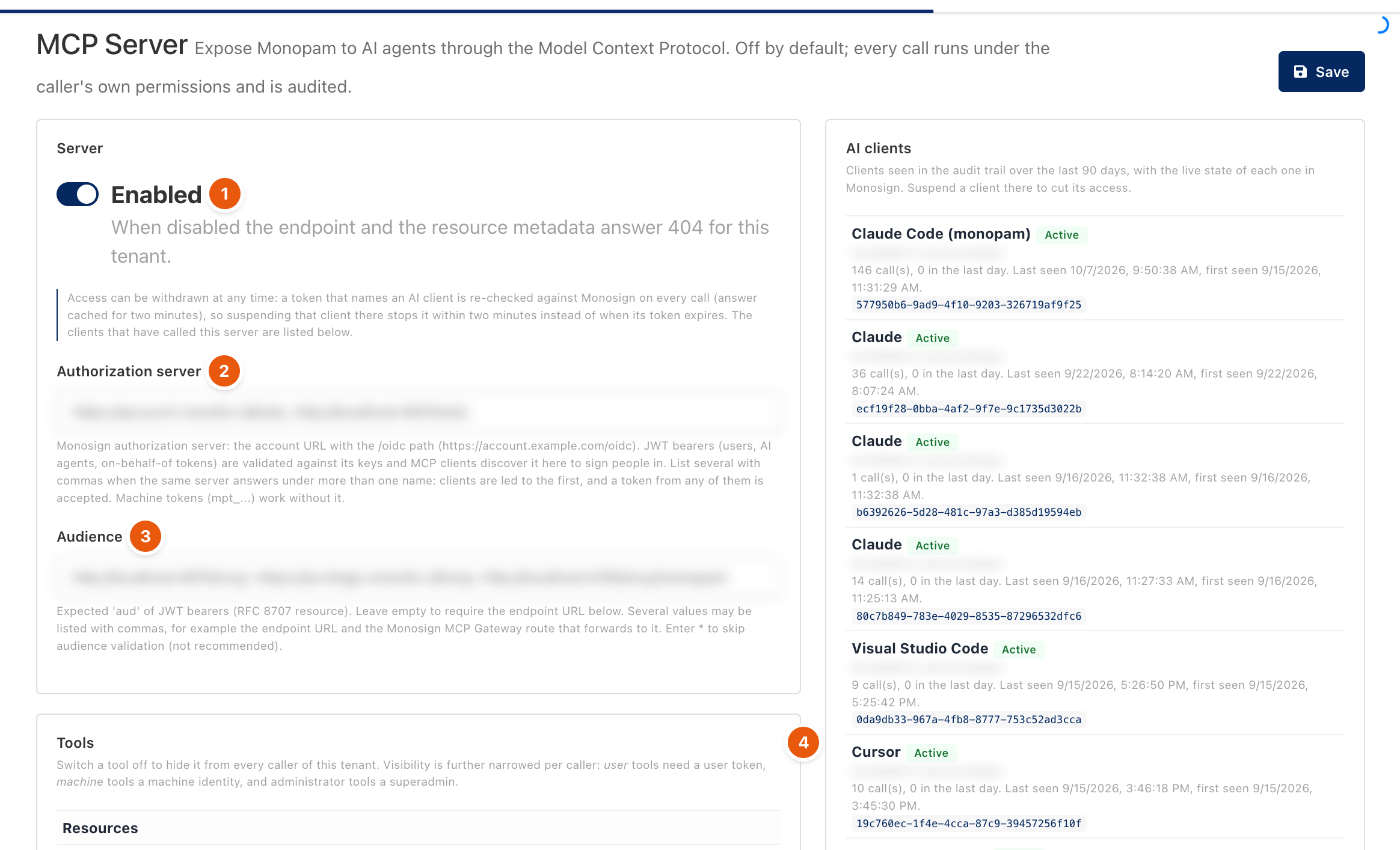
Figure 1. System → MCP Server. Addresses are blurred.
Turn it on
- Open System → MCP Server and turn on Enabled (1). While it is off, the endpoint answers 404.
- Authorization server (2): the Monosign account URL with the
/oidcpath. User and AI agent tokens are validated against it, and clients use it to sign people in. Machine tokens (mpt_...) work without it. - Audience (3): the expected audience of tokens. Leave it empty to require the endpoint URL.
- Under Tools (4), switch off any tool you do not want to offer. Click Save.
Connect a client
The Connect a client card shows the endpoint address. Add the server to the client with a bearer token:
{
  "mcpServers": {
    "monopam": {
      "type": "http",
      "url": "https://<monopam>/mcp",
      "headers": { "Authorization": "Bearer <token>" }
    }
  }
}
Token | Acts as |
|---|---|
A machine identity token ( | The machine identity and its Secrets grants. |
A Monosign user token | The Monopam user, with every access policy applied. Clients that support sign-in ask the person to approve the client once. |
A Monosign AI agent token | Accepted only when an OIDC machine identity binds it. |
What agents can do
- Look up resources, credentials, certificates and their own requests and sessions.
- Create access requests that go through the normal approval flow.
- Open sessions: run commands over SSH, queries through the Database Proxy, clicks and keystrokes on RDP and VNC, and Kubernetes API calls. Sessions are recorded, appear in Live Sessions with an AI badge, and obey Privileged Commands and Database Rules.
- When an action needs approval, the tool answers that approval is pending and the request appears in Requests.
AI clients lists the clients that called the server in the last 90 days with their state in Monosign. Suspend a client in Monosign to cut its access within about two minutes.
Troubleshooting
What you see | Why | What to do |
|---|---|---|
The client gets 404. | The MCP Server is off for the tenant. | Turn on Enabled. |
The client gets 401. | The token's issuer or audience does not match the settings. | Check Authorization server and Audience. |
Related
- Identities and the CLI
- Audit log
- Privileged Commands
- Database Rules