Provider access decides who of the provider's own staff may work inside each customer tenant, with which rights and until when. A person with a grant opens the customer tenant from the main tenant's header with Open tenant, without a second sign-in.
Applies to | Who can do this |
|---|---|
Monopam v2026.10 | Users of the main tenant with |
Before you begin
- The customer tenant exists and its seed is complete.
- The tenant's access policies that hold the resources and credentials the person should reach. They are created inside the tenant, for example by a provider user with the Tenant Admin role, and only chosen here.
The grant list
Open System → Provider Access. Access Grants lists every grant across tenants with its role (3), state, end date and last use. Grant Access (1) adds one, Manage Roles (2) edits the provider roles, and Shared Vault Items (4) lists every vault item shared with a tenant. The same lists exist per tenant under System → Tenants → tenant.

Figure 1. System → Provider Access.
Grant access
- Click Grant Access and choose the Tenant.
- Under Who (1), choose A user of the main tenant or A Monosign group. A group grant reaches everyone who joins the group later; a personal grant of the same person wins over a group grant. External (vendor) users cannot be given access.
- Choose the Role (2). It decides what the person may do inside the tenant.
- Tick the tenant Policies (3). They decide which spaces, resources and credentials the person sees: the person becomes a member of them exactly as if a policy rule matched. Without policies the person sees only what the tenant's own rules give, usually just the default space.
- Set Access ends (4) or keep No end date, add a reason and click Save.
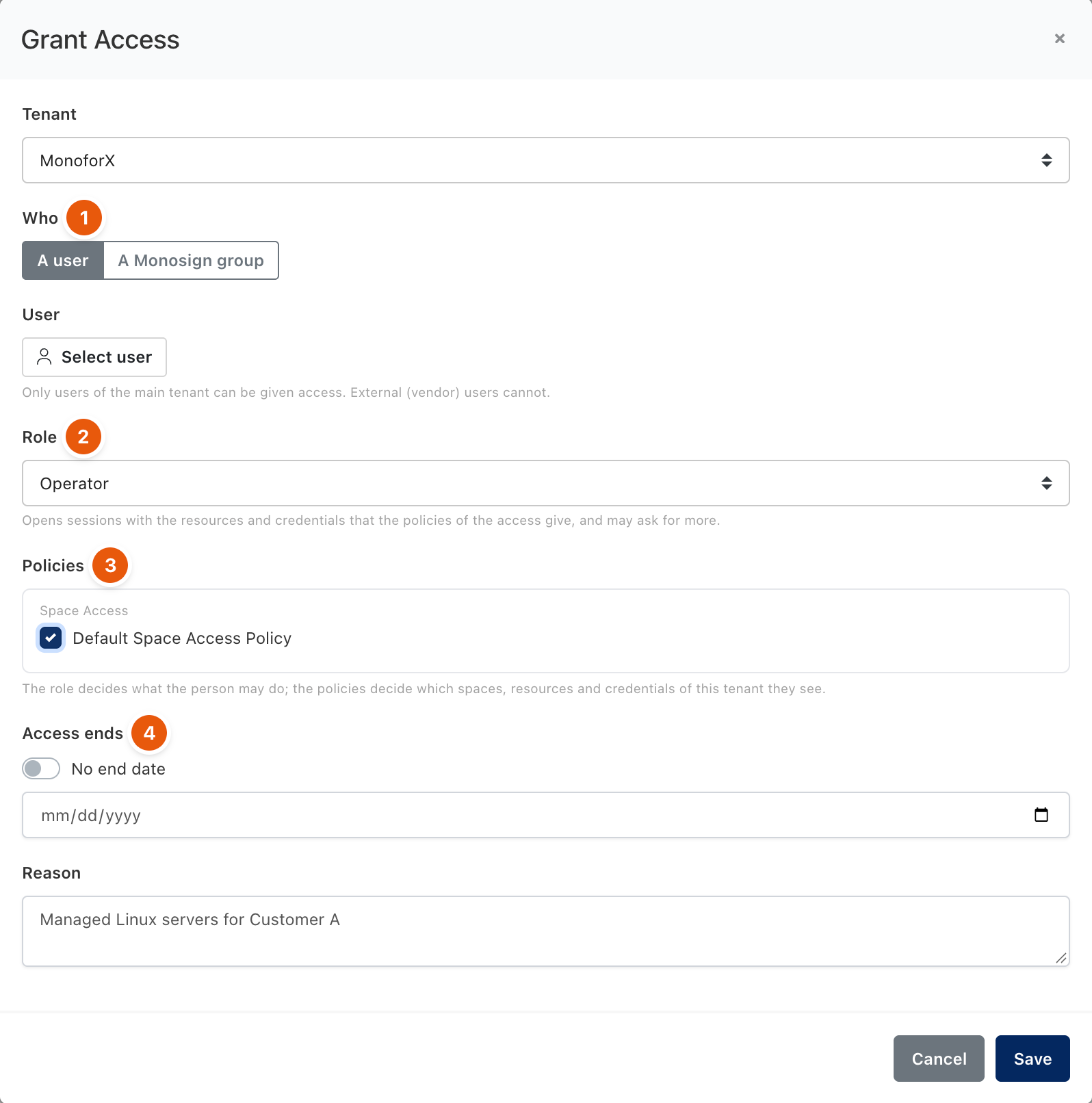
Figure 2. Granting a provider user access to a customer tenant.
Holders of monopam.federation.request can ask for access the same way; the grant waits as Pending approval until someone with monopam.federation.full approves or rejects it on this page. Nobody is notified automatically.
Roles
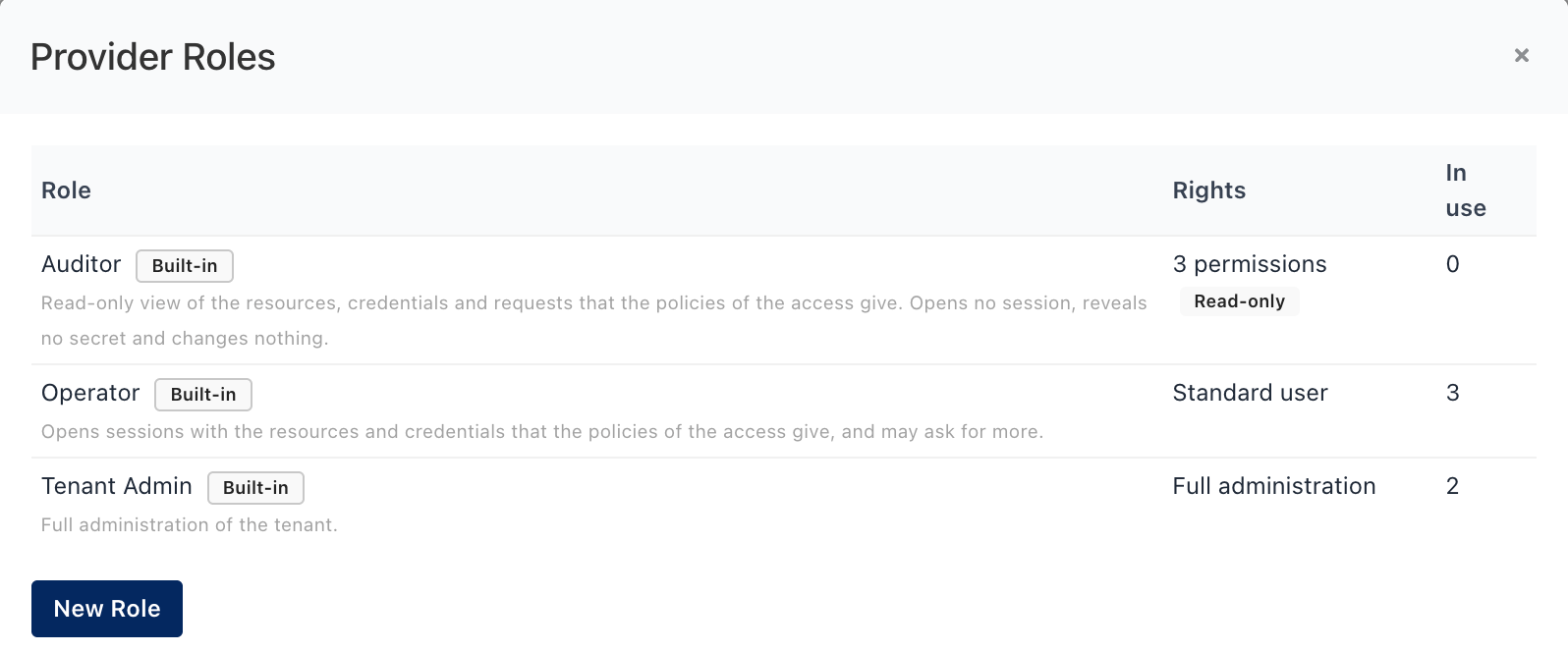
Figure 3. The three built-in roles.
Role | Inside the tenant |
|---|---|
Tenant Admin | Full administration of the tenant. |
Operator | A standard user: the Resources page with Connect, Vault and Requests, for what the policies of the access give. |
Auditor | Read-only. Lists resources, credentials and requests the policies give; opens no session, reveals no secret and changes nothing. The server refuses those requests with This access is read-only. Opening sessions, revealing secrets and saving changes are not part of it. |
New Role creates custom roles: a title, optional Full administration, optional Read-only and Monopam permissions. Leave the permissions empty for people who connect; a module permission switches that module to its management list, which has no Connect. Mark a role Read-only whenever the person must not open sessions or see secrets: read permissions alone choose pages, they do not limit the API.
Working in a customer tenant
- Open tenant in the main tenant's header lists the person's own usable grants. Choosing one opens the tenant in a new browser tab with a signed, single-use entry link valid for 60 seconds.
- The header badge
<tenant> · <role>shows that the tab is a customer tenant; a read-only role adds (read-only). - On first entry the person appears in the tenant's Users list with a Provider badge. The tenant can disable that user to refuse the person.
- A delegated session lasts at most 8 hours or until Access ends, whichever is sooner. Suspending, revoking or expiring the grant ends it within about 20 seconds.
- If the tenant allows it, the person can also start from the tenant's own address with Sign in as service provider.
- Both sides are audited: grant changes and entries on the main tenant, entries and rejections on the customer tenant.
Troubleshooting
What you see | Why | What to do |
|---|---|---|
The person sees an empty resource list. | The grant has no policies, or the policies are disabled in the tenant. | Use Change on the grant to add policies; a disabled policy gives nothing until enabled in the tenant. |
The entry could not be verified; try again in a moment. | The cache (Redis) is unreachable. | Restore the cache; open sessions keep working. |
The assertion has expired. or is not valid yet. | The server clocks differ by more than 30 seconds. | Synchronise the clocks with NTP. |
A policy shows as Removed policy. | The policy was deleted in the tenant. | Clean it up with Change. |
Related
- Service Provider Guide
- Tenants and tenant databases
- Remote tenants
- Shared vault items
- How policies work