A provider can make a vault item of its main tenant usable inside a customer tenant without copying the secret. The tenant gets a read-only vault item with the same name; every use reads the secret from the main tenant at that moment, so a password rotated by the provider is current in every tenant at once.
Applies to | Who can do this |
|---|---|
Monopam v2026.10 | Super administrators of the main tenant or users with |
Share a vault item
- Open the vault item in the main tenant and choose Share to Tenants from its menu, or open System → Tenants → tenant → Shared Vault Items and click Share Vault Item.
- Choose the Tenant.
- Choose the Use (1). Off (the default, Sessions only): the vault item opens sessions, but its secret is not shown, not returned by the vault API and not placed into scripts. On (Sessions and reveal): the tenant's own vault policies decide who may reveal it.
- Set Share ends (2) or keep No end date, add a reason and click Save.
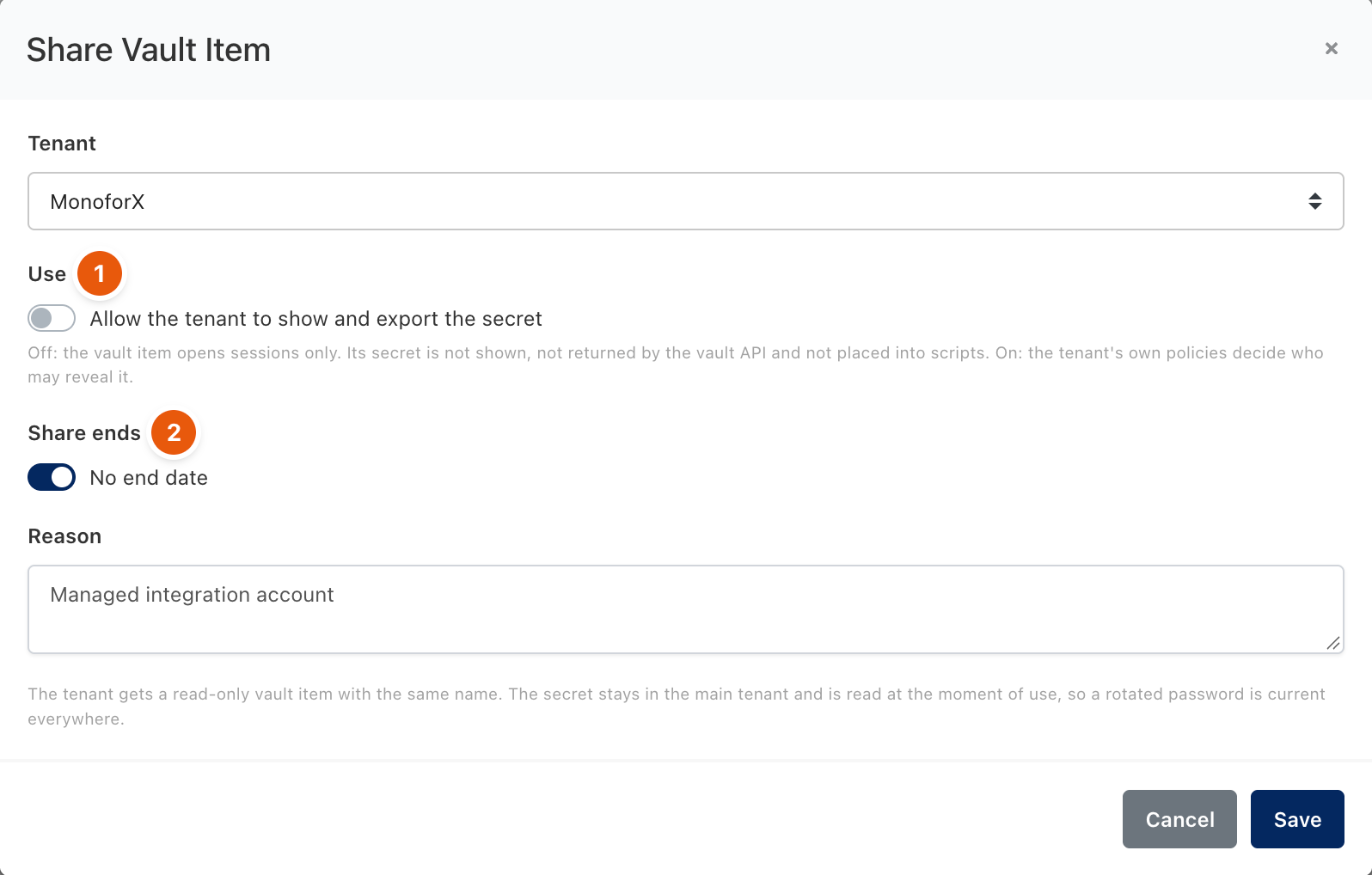
Figure 1. Sharing a provider vault item with a customer tenant.
In the customer tenant
- The vault item appears in the tenant's default space marked Shared from provider, without a Save button.
- The tenant assigns it to its resources, spaces and policies like any other vault item.
- The user name stays visible to users who may see the vault item; the secret follows the use mode.
- Nothing secret is stored in the tenant, whether the tenant uses the installation database, its own database or its own installation.
Change or end a share
- Suspend and Resume: a suspended share makes the tenant's vault item read as nothing at once; new sessions that use it are refused.
- Revoke removes the vault item from the tenant together with its resource and policy assignments. Sharing it again creates a new vault item that must be assigned again.
- Rotation, password history, expiry and reconcile run only on the main tenant's vault item.
- Each use is audited on the main tenant (at most one entry a minute per share); arrival and removal are audited on the tenant.
Limits
- Personal vault items, vault items that are themselves shared, and the types OTP, Single Sign-On, Ephemeral, Pool and Kubernetes Token cannot be shared.
- Sharing works from the main tenant only, never from one customer tenant to another.
- A tenant that already has a vault item with the same name cannot receive the share.
- For a remote tenant, shared vault items work only while its link to the provider is up.
Troubleshooting
What you see | Why | What to do |
|---|---|---|
Sessions in the tenant fail with The provider's share of this vault item is suspended or has ended. | The share was suspended, revoked or expired, or the main tenant's database is unreachable. | Check the share's state on the main tenant. |
The tenant is not ready yet (no default space); run its seed first. | The tenant's seed has not completed. | Run the seed on the tenant's Overview. |
A | The share is Sessions only. | Share it with Allow the tenant to show and export the secret if the tenant needs the value itself. |
Related
- Service Provider Guide
- Provider access
- Vault items
- Password rotation and reconcile