AI Activity is the audit record of Mono AI. Every AI interaction is recorded: which feature was used, who used it, which model answered, the outcome, and the human decision on the suggestions. Administrators and auditors can use this page to see how AI is used in the environment, to investigate a result, and to follow failed requests.
The page is read-only. The records cannot be changed from this page.
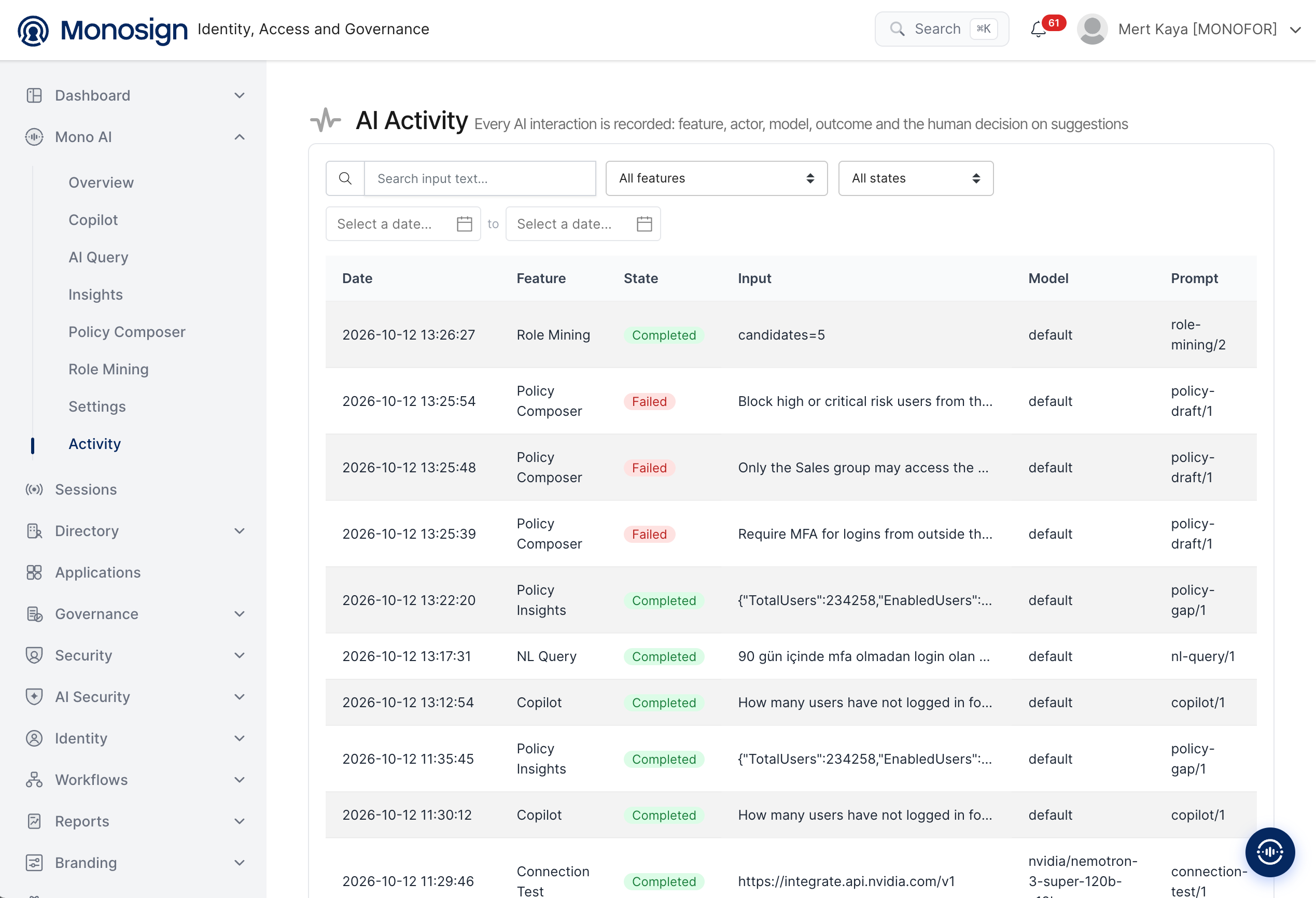
To open the page, click Mono AI in the left menu and then Activity. The page has two main parts.
Filters -> Search and filter the records at the top of the page.
Activity table -> Lists the AI interactions, newest first.
Filters
Filter | Description |
|---|---|
Search input text | Searches the text of the input (the question or the data that was sent to AI). |
All features | Shows only the records of the selected Mono AI feature, for example Copilot, NL Query or Role Mining. |
All states | Shows only the records with the selected state, for example Completed or Failed. |
Select a date ... to ... | Shows the records in the selected date range. |
Activity Table
Each row is one AI interaction. The table has the following columns.
Column | Description |
|---|---|
Date | Date and time of the interaction. |
Feature | Mono AI feature that made the request (see the feature table below). |
State | Result of the request: Completed (green) or Failed (red). |
Input | The question or the data that was sent to AI. Long inputs are shortened with "...". |
Model | Model that answered the request. |
Prompt | The prompt template that was used and its version, for example |
The page description also lists the actor (who made the request) and the human decision on the suggestions as recorded information. If these values are not visible in the table, scroll the table to the right or check the record details.
Features and Prompts
The following feature names and prompt templates are shown in the records.
Feature | Prompt | Used by |
|---|---|---|
Copilot |
| Questions asked on the Copilot page. |
NL Query |
| Natural language questions on the AI Query page. |
Policy Insights |
| Security posture analysis on the Insights page. The input contains the summary numbers of the environment. |
Policy Composer |
| Policy drafts that are created from a plain-language description. |
Role Mining |
| Candidate role analysis on the Role Mining page. The input shows the number of candidates, for example |
Connection Test |
| The Test connection button on the AI Settings page. The input shows the endpoint that was tested. |
Investigating a Record
Select the feature, the state and the date range to narrow down the list.
Use Search input text if you know a word from the question.
Check the State. For a Failed record, check the model and the connection in AI Settings and use Test connection.
Check the Model and Prompt columns to see which model and prompt version produced the result.
Security and Design Principles
Full record -> Every AI interaction is recorded, so it is always possible to see what was asked and what was used to answer.
Transparent -> The model and the prompt version of each request are visible.
Human decision -> AI only suggests. The decision of the administrator on the suggestions is part of the record.
Read-only -> The page only shows the records and does not change them.
The Input column can contain the question text or summary data that was sent to AI. Give access to this page only to the administrators and auditors who are allowed to see this information.