Copilot is the chat assistant of Mono AI. Administrators ask questions about users, applications, sessions, MFA, audit events and risk in plain language and get the answer directly in the chat, without opening each screen and filtering the lists manually.
Copilot is a read-only assistant. It answers only from the tools it runs under the permissions of the signed-in administrator, and it shows which tools it ran for each answer. It cannot change users, applications or any other setting.
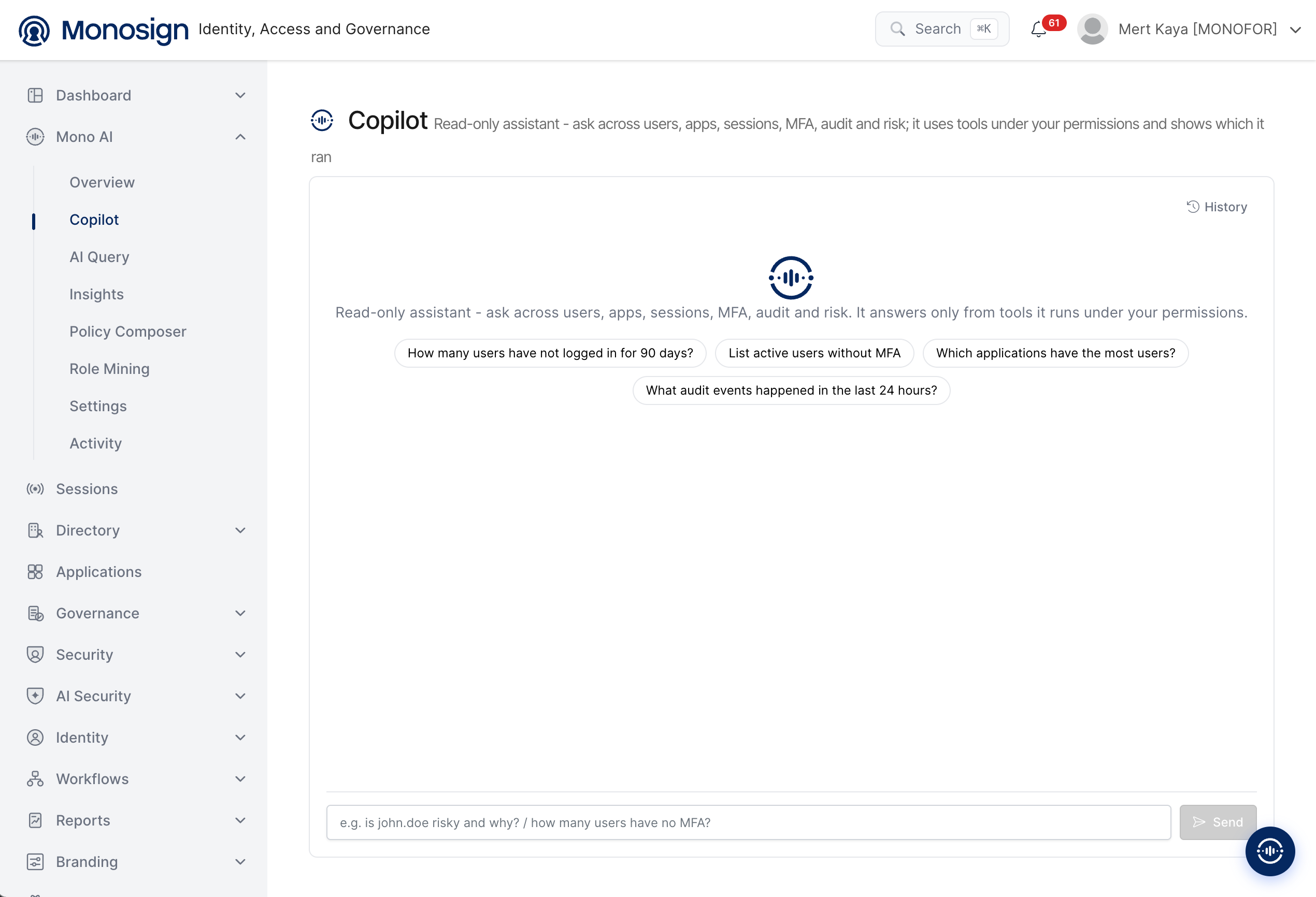
To open the page, click Mono AI in the left menu and then Copilot. The main parts of the screen are as follows.
Description line -> The title area explains the scope of the assistant: read-only, and limited to the permissions of the signed-in user.
History -> The button in the upper right corner of the chat area opens the previous conversations.
Suggested questions -> Ready-to-use questions are shown when the chat is empty. Clicking one sends it to Copilot.
Message box -> The question is typed at the bottom of the screen and sent with the Send button. The button is active only when the box is not empty.
Suggested Questions
The following example questions are shown on the empty chat screen.
Question | What it is used for |
|---|---|
How many users have not logged in for 90 days? | Finds inactive users, for example to clean up old accounts. |
List active users without MFA | Lists active users who have no multi-factor authentication method. |
Which applications have the most users? | Shows the most used applications by number of users. |
What audit events happened in the last 24 hours? | Summarizes the recent audit records. |
Asking a Question
Type the question in plain language in the message box and click Send. The message box shows examples such as is john.doe risky and why? and how many users have no MFA?.
Write the question. You can use user names, application names and time ranges in the text.
Click Send. Copilot selects the tools that are needed and runs them with your permissions.
Read the answer in the chat. The tools that were used are shown with the answer, so you can see where the information comes from.
Ask a follow-up question in the same conversation if you need more detail.
History
Click History to see the earlier conversations and open them again. Every Copilot request is also recorded on the AI Activity page.
Security and Design Principles
Copilot is designed as a question-and-answer assistant. It is built to inform the administrator, not to operate the system.
Answers questions only -> Copilot is designed only to answer the questions asked by the administrator. It does not start any process on its own.
Takes no action -> Copilot does not create, change, disable or delete anything in Monosign. When an action is appropriate, Copilot only suggests it, and the administrator decides and performs it on the related Monosign screen.
Confidential information is protected -> Confidential data such as secrets and credentials, and the tables that hold them, are kept hidden from Copilot. They are never read, shown in an answer or sent to the AI model.
Permission based -> Copilot works with the permissions of the signed-in administrator, and cannot return data that the administrator is not already allowed to see.
Traceable -> The tools used for each answer are shown in the chat, and every request is recorded on the AI Activity page.
Copilot gives information and recommendations only. The final decision and the action always stay with the administrator.
Copilot answers are generated by an AI model. Please check important results, such as a list of users to be disabled, on the related Monosign screen before taking an action.