AI Settings is the page where the administrator chooses how Mono AI runs for the environment (tenant). Mono AI can run on a Managed model that is hosted by Monofor, or on the organization's own model with BYOM (bring your own model). The page also turns the AI features on or off, shows the token usage and defines the limits.
To open the page, click Mono AI in the left menu and then Settings.
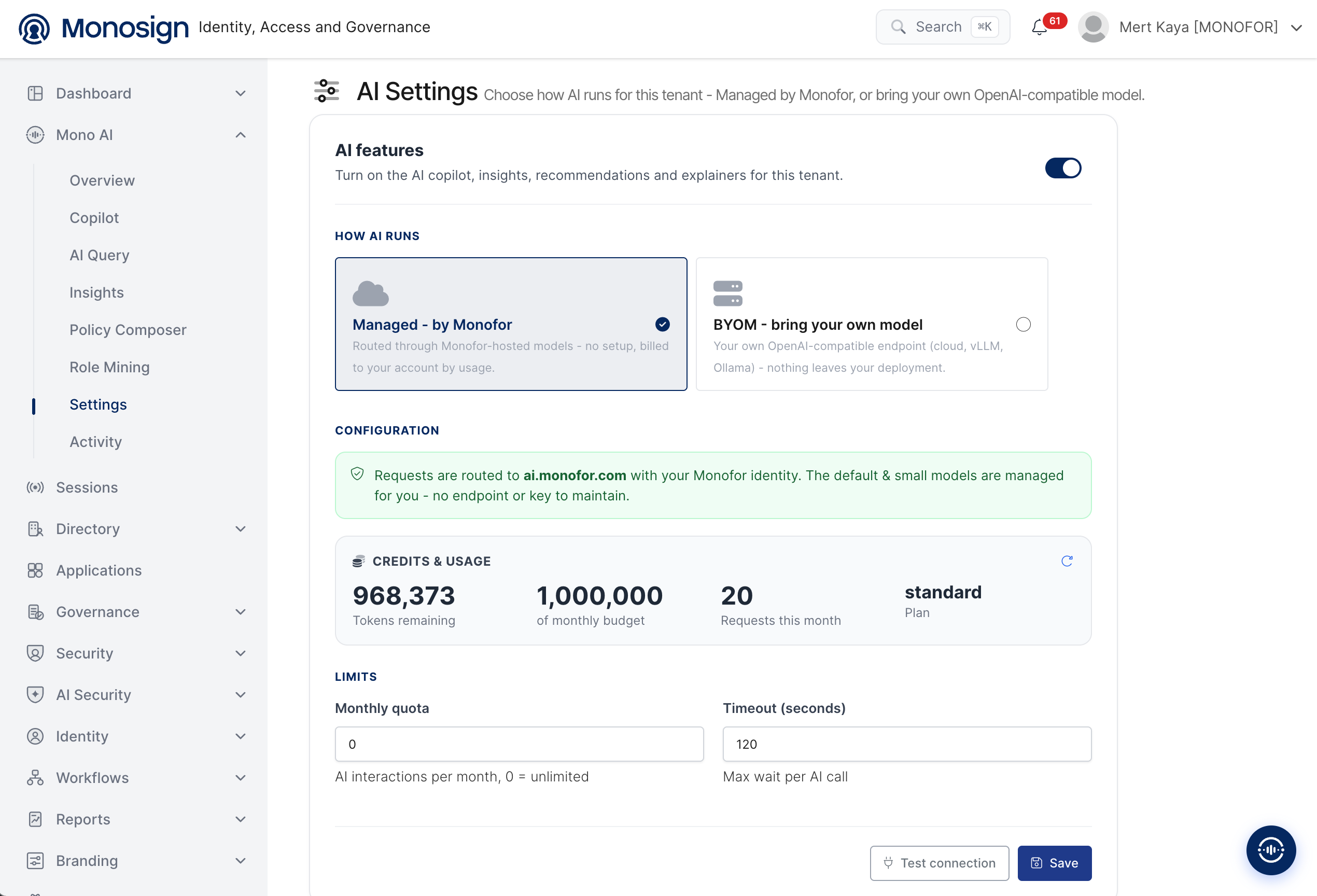
The page has the following parts.
AI features -> Turns on or off the AI features of the environment: Copilot, Insights, recommendations and explainers.
How AI runs -> Selects the model type: Managed - by Monofor or BYOM - bring your own model.
Configuration -> Shows the connection details of the selected model type.
Credits & usage -> Shows the token budget and usage (Managed only).
Limits -> Defines the monthly quota and the timeout.
Test connection and Save -> Tests the connection of the selected model and saves the settings.
AI Features
The AI features switch at the top turns on the AI Copilot, Insights, recommendations and explainers for the environment. When it is turned off, the Mono AI features are not available to the administrators.
How AI Runs
Option | Description |
|---|---|
Managed - by Monofor | Requests are routed through the models that are hosted by Monofor. No setup is needed, and the usage is billed to your account. |
BYOM - bring your own model | Mono AI uses your own OpenAI-compatible endpoint, for example a cloud provider, vLLM or Ollama. Nothing leaves your deployment. |
Managed - by Monofor
When Managed - by Monofor is selected, the Configuration area shows a green information message. The requests are routed to ai.monofor.com with your Monofor identity. The default and small models are managed for you, so there is no endpoint or key to maintain.
Credits & Usage
This card shows the token usage of the environment.
Value | Description |
|---|---|
Tokens remaining | Number of tokens that are still available. |
of monthly budget | Total token budget. For a standard customer it is |
Requests this month | Number of AI requests made in the current month. |
Plan | Plan of the customer, for example |
The refresh icon on the upper right of the card updates the values.
Free tokens: Every standard customer who selects Managed - by Monofor gets 1,000,000 free tokens. This amount is enough for the standard processes, such as questions in Copilot and AI Query, Insights analyses and Role Mining. If more tokens are needed, the amount can be increased by purchase.
Limits
Property | Description |
|---|---|
Monthly quota | Maximum number of AI interactions per month. |
Timeout (seconds) | Maximum time that Mono AI waits for an AI call. The default value in the example is |
BYOM - Bring Your Own Model
Select BYOM - bring your own model to connect your own model. The Configuration area asks for the connection details.
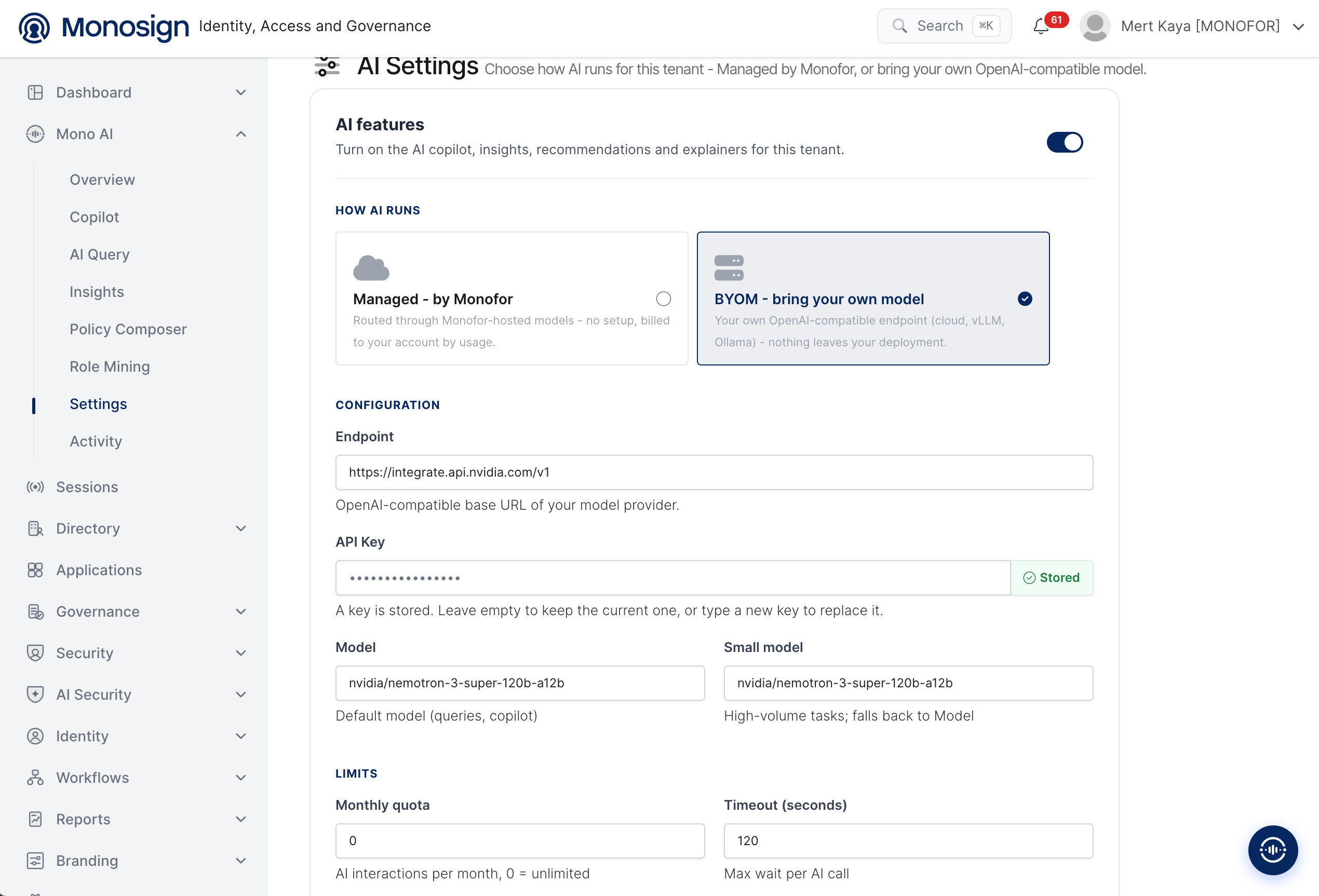
Property | Description |
|---|---|
Endpoint | OpenAI-compatible base URL of your model provider, for example |
API Key | API key of the model provider. When a key is already saved, the Stored label is shown and the key is hidden. Leave the field empty to keep the current key, or type a new key to replace it. |
Model | Default model. It is used for queries and Copilot. |
Small model | Model for high-volume tasks. If it is empty, the default Model is used. |
Test Connection and Save
Select the model type and fill in the required fields.
Click Test connection to check that Mono AI can reach the model. The result is also recorded on the AI Activity page as a Connection Test.
Click Save to apply the settings.
With BYOM, the AI requests are sent to the endpoint that you define. Use a provider that complies with the data protection rules of your organization. The API key is stored hidden and is not shown again after it is saved.
The free token budget is given for Managed - by Monofor. With BYOM the requests use your own model and are billed by your model provider.