Policy Composer drafts an access policy from a description written in plain language. The administrator describes the rule, for example who can access an application or when MFA is required, and AI prepares the policy draft. The administrator does not need to know the policy structure or build the conditions one by one.
The draft is always created disabled and is never applied automatically. The administrator reviews the draft, creates the policy and enables it only when it is correct. Until then the draft has no effect on the users.
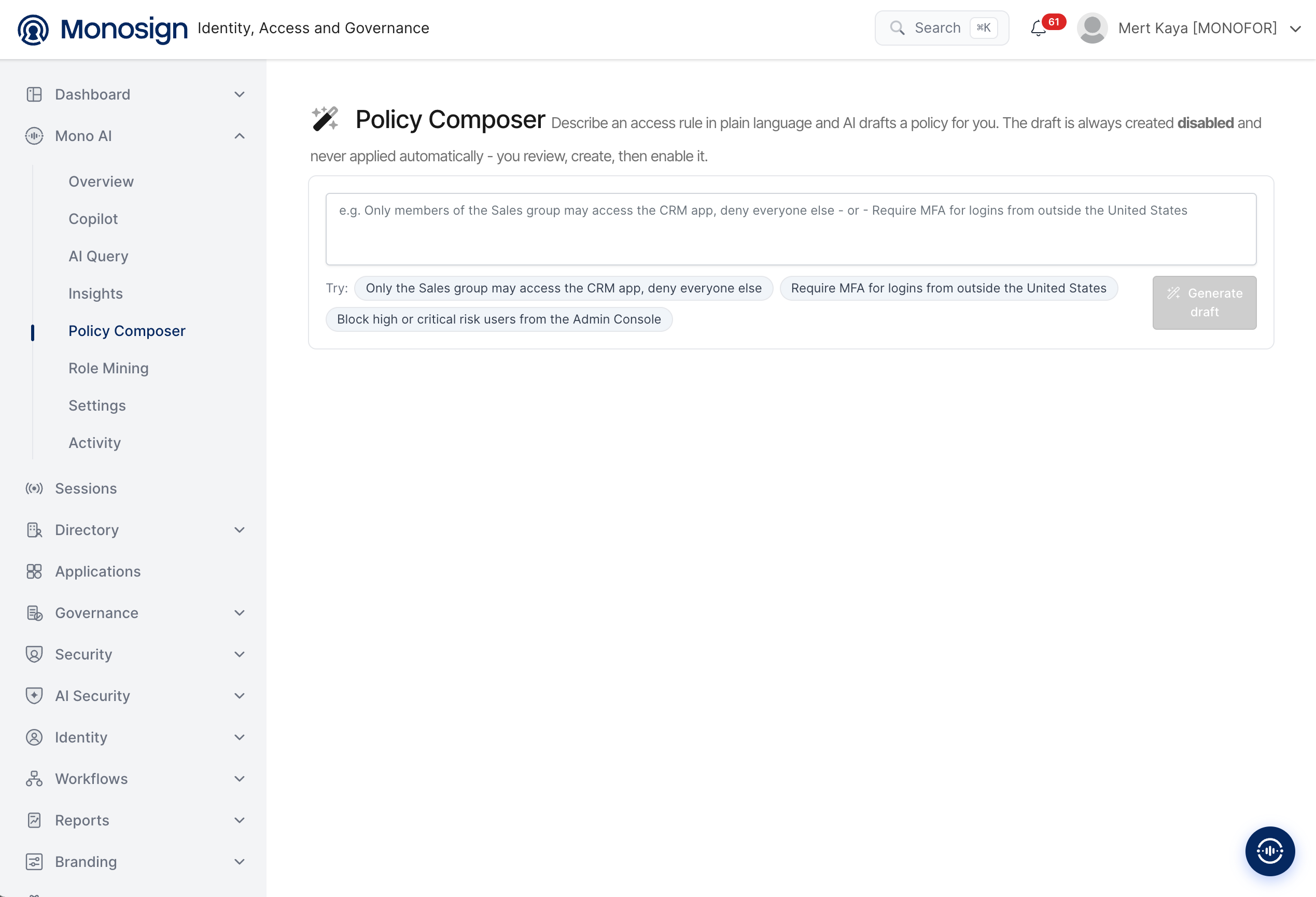
To open the page, click Mono AI in the left menu and then Policy Composer. The main parts of the screen are as follows.
Description line -> Explains that an access rule is described in plain language, that AI drafts the policy, and that the draft is always created disabled and never applied automatically.
Description box -> The rule is written here. The box shows examples such as Only members of the Sales group may access the CRM app, deny everyone else and Require MFA for logins from outside the United States.
Try -> Ready-to-use example rules. Clicking one puts it in the description box.
Generate draft -> Sends the description to AI and creates the draft. The button is active only when the description box is not empty.
Example Rules
The following examples are shown under Try.
Rule | What it is used for |
|---|---|
Only the Sales group may access the CRM app, deny everyone else | Limits the access to an application to the members of one group. |
Require MFA for logins from outside the United States | Requires multi-factor authentication according to the location of the login. |
Block high or critical risk users from the Admin Console | Blocks the users with a high or critical risk level from the administration console. |
Creating a Policy Draft
Write the rule in plain language in the description box, or click one of the Try examples. Write clearly who (user or group), what (application or resource) and under which condition (for example location, MFA or risk level).
Click Generate draft. AI prepares the policy draft from the description.
Review the draft carefully: the users or groups, the application, the conditions and the action.
Create the policy. It is created in the disabled state.
Test the rule if possible, then enable the policy when you are sure that it is correct.
A policy can block users from applications. Check especially the rules that deny access (for example deny everyone else) before enabling them, so that the administrators and the required users are not locked out.
Security and Design Principles
Always disabled -> A draft is always created in the disabled state, so it has no effect until the administrator enables it.
Never applied automatically -> AI only drafts. The administrator reviews, creates and enables the policy.
Administrator decision -> The final decision always stays with the administrator.
Permission based -> Policy Composer works with the permissions of the signed-in administrator.
Traceable -> Every draft request is recorded on the AI Activity page with the feature name Policy Composer and the result.
The draft is generated by an AI model and can be different from what was meant. If the draft is not correct, rewrite the description with more detail and generate it again.