An agent is software on a managed Windows, Linux or macOS machine. It lets Monopam manage local accounts and run scripts from inside the machine. Agents keep an outbound connection to Monopam (the agent channel), so the machine does not need to accept inbound connections.
Applies to | Who can do this |
|---|---|
Monopam v2026.10 | Administrators with permission to manage resources and agents. |
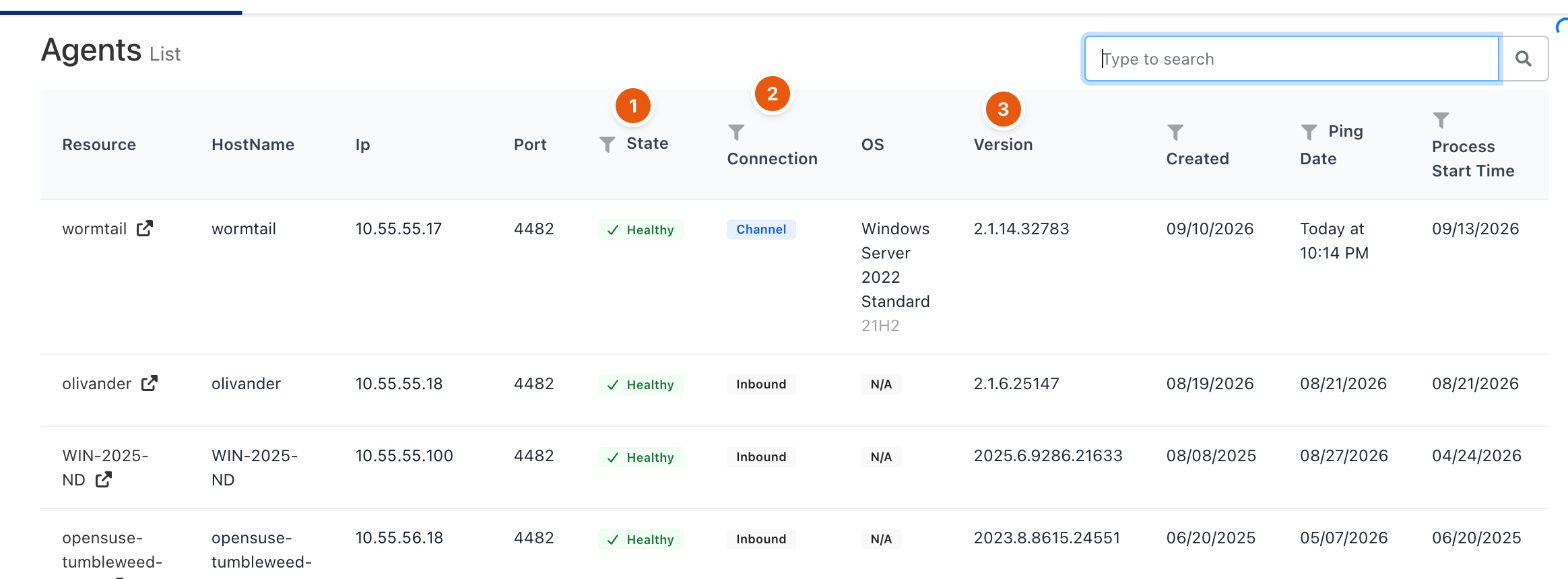
Figure 1. Agents.
# | Column | Meaning |
|---|---|---|
1 | State | Healthy when the agent answers; Error when it does not. |
2 | Connection | Channel: the agent keeps an outbound connection to Monopam. Inbound: Monopam reaches the agent on its port (4482 by default), used by older agents and as a fallback. |
3 | Version | The agent version. OS, Ping Date and Process Start Time help spot agents that stopped reporting. |
Install an agent
- Open Resources, open the table menu (⋮) and click Import with Agent.
- Choose Windows, Linux or macOS. Monopam generates a setup key valid for 24 hours and a one-line install script. Turn on I'm using a self-signed certificate if needed.
- Run the script on the machine with administrator rights. The agent enrolls, creates the resource (or attaches to an existing one) and appears in Agents.
Once enrolled, the agent serves local account operations (discover, verify, set and remove passwords) and script runs on that machine.
Troubleshooting
What you see | Why | What to do |
|---|---|---|
The agent shows Error. | The machine is off, the agent service stopped, or neither the channel nor the inbound port is reachable. | Check the agent service on the machine and its Ping Date. For inbound agents, check that port 4482 is reachable from the gateway. |
Related
- Gateways
- Local accounts
- Script Library