A site is a location such as a plant, a data center or a branch. Gateways and resources that belong to the same site are paired: a resource in a site is reached through that site's gateways unless it is pinned to specific gateways. Sites are optional; without them Monopam uses all gateways.
Applies to | Who can do this |
|---|---|
Monopam v2026.10 | Administrators with permission to manage sites. |
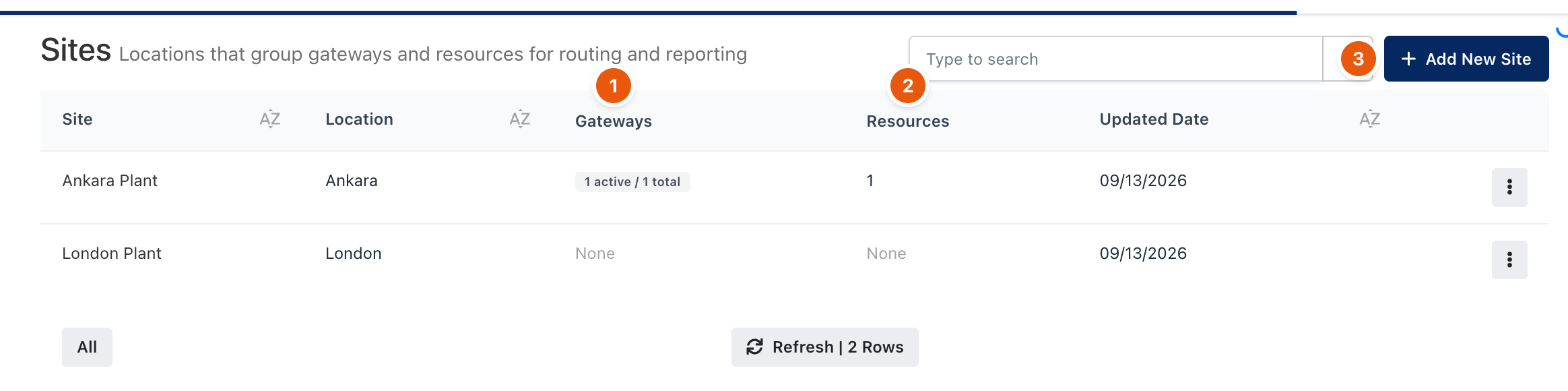
Figure 1. Sites.
- Open Sites and click Add New Site (3). Enter a name, an optional location and description, and save.
- Assign gateways: open a gateway and choose its Site.
- Assign resources: on the resource's Advanced tab, choose the Site.
The list shows each site's Gateways (1) as active and total, and its Resources (2). Open a site to see its gateways with their health, its resources and live connections. Activity Report in the row menu lists the connections to the site's resources over 7, 30, 90 or 365 days, with Export CSV and Export PDF.
Which gateway is used
- Gateways pinned on the resource or in the policy always win.
- Otherwise, the gateways of the resource's site are used.
- Otherwise, any active gateway can be used. A site without gateways does not restrict its resources.
Related
- Gateways
- Add a resource