When a certificate enters the inventory, this flow logs in to the CMDB, asks who owns the host, adds that person as an owner of the certificate and copies two CMDB fields (application and cost center) into the certificate's custom fields. It uses the token pattern described in Call an API that needs a token.
Applies to | Who can do this |
|---|---|
Monopam v2026.10 | Super administrators. |
Before you begin
- A vault item with the CMDB's client ID (Username) and secret (Password). Here it is named
cmdb-api-client. - Two custom field types that apply to Certificate, created under Custom Fields → New Field Type:
ApplicationandCostCenter(title Cost center). Putting them in one group (here CMDB) shows them together on the certificate. - The owners the CMDB names must be Monopam users; the e-mail address is what the flow matches on.
The flow
Step | Type | Settings |
|---|---|---|
Trigger | A certificate enters the inventory | Event |
Get a token | Ask an API | POST |
Ask the CMDB with the token | Ask an API | GET |
Set the owner | Set the owner | Who |
Write Application | Write a custom field | Field |
Write Cost center | Write a custom field | Field |
Done | Stop | OK, |
No token | Stop | From Get a token → failed. Failure, |
Not in the CMDB | Stop | From Ask the CMDB → failed. Warning, |
Body of Get a token:
{"client_id":"{{Vault.cmdb-api-client.UserName}}","client_secret":"{{Vault.cmdb-api-client.Password}}"}
The CMDB answers the asset lookup like this. Every field is readable as cmdb.json.<path>, so the owner's e-mail is cmdb.json.owner.email:
{"fqdn":"api.example.com","application":"Partner API","costCenter":"CC-4200",
 "environment":"Production","owner":{"name":"PAM Basic","email":"[email protected]"}}
The screenshots come from a lab where the CMDB runs at http://localhost:4096; replace it with your CMDB's address.
Build it
- Open Scripts → Flows, click New Flow and choose the event A certificate enters the inventory.
- Drag the steps from Add node and connect them as in the table: Get a token (1), Ask the CMDB with the token (2), Set the owner (3), then the two custom field steps and Done. Connect each failed output to its Stop.
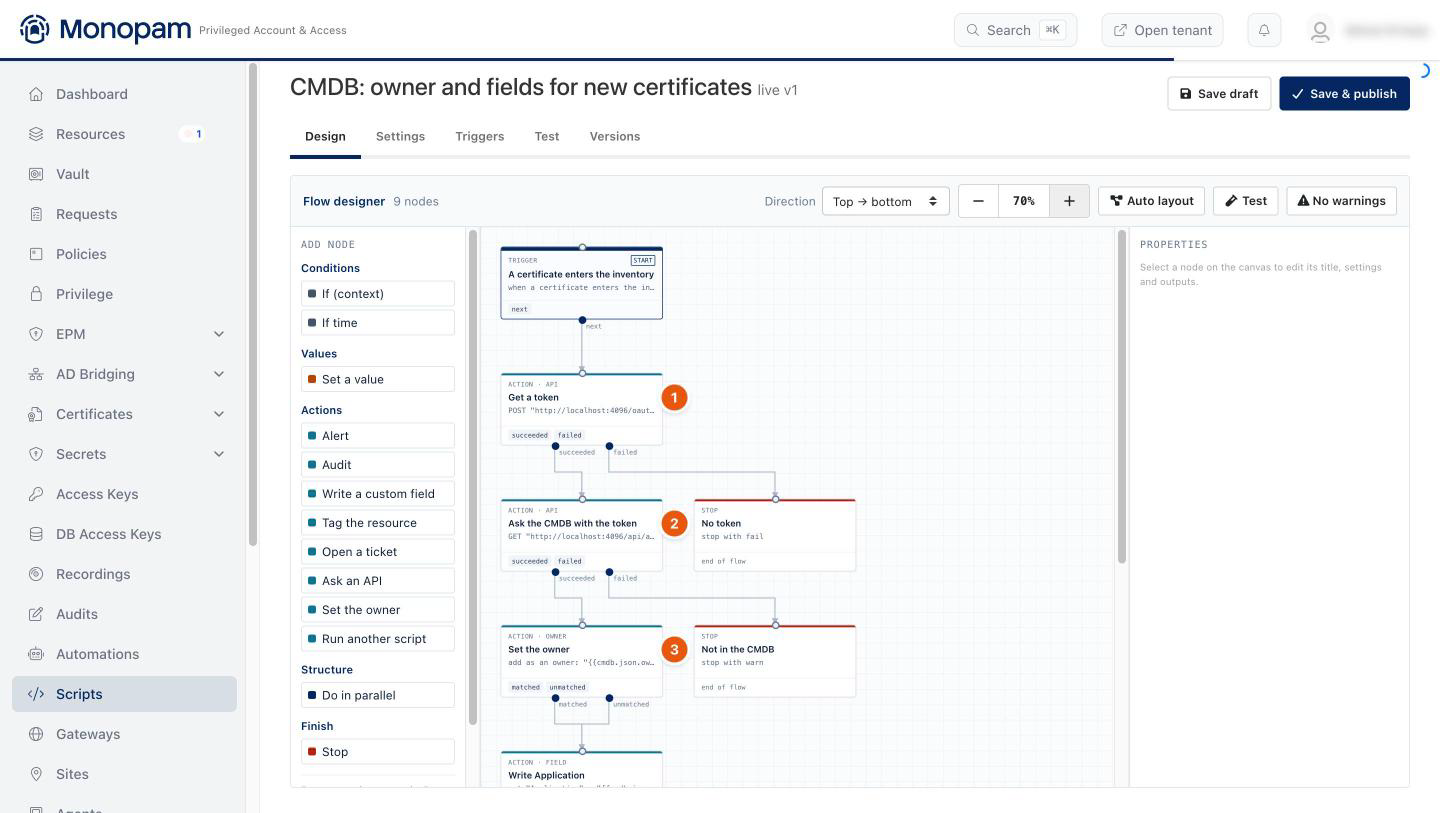
Figure 1. The certificate flow on the designer canvas.
- Click Save & publish. From now on every certificate that enters the inventory (an import, or a scan finding taken in) runs the flow. A re-import of a certificate that is already in the inventory does not.
Check the result
Open Scripts → Flow Runs and click Steps on the run. The token request (1) and the CMDB lookup (2) show the status code and how many fields each answer produced; the owner (3) and the custom fields (4) show what was written.
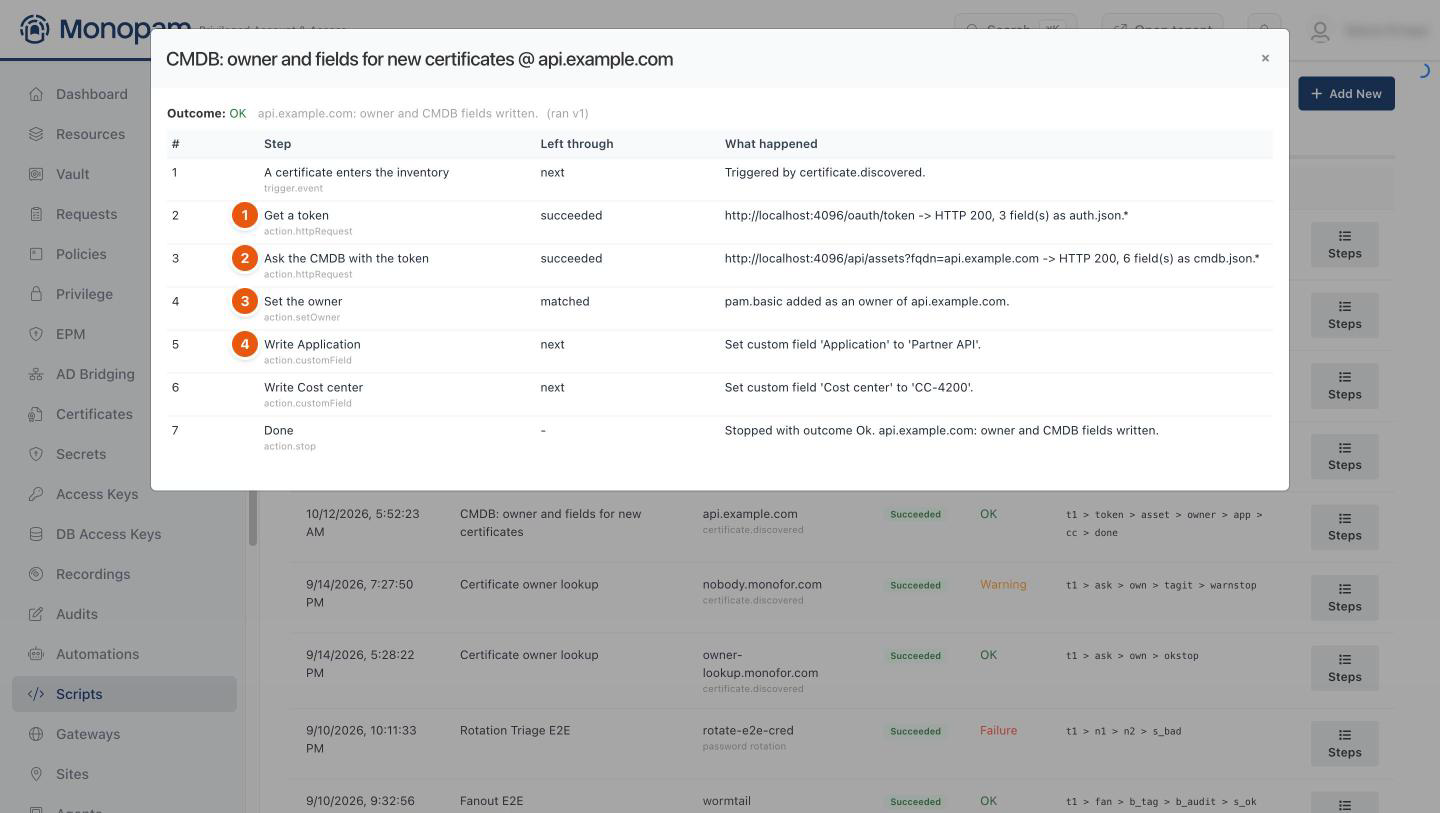
Figure 2. One run, step by step.
On the certificate, the owner (1) is added and the CMDB values (2, 3) are in its custom fields. The owner is notified before the certificate expires and may renew it.
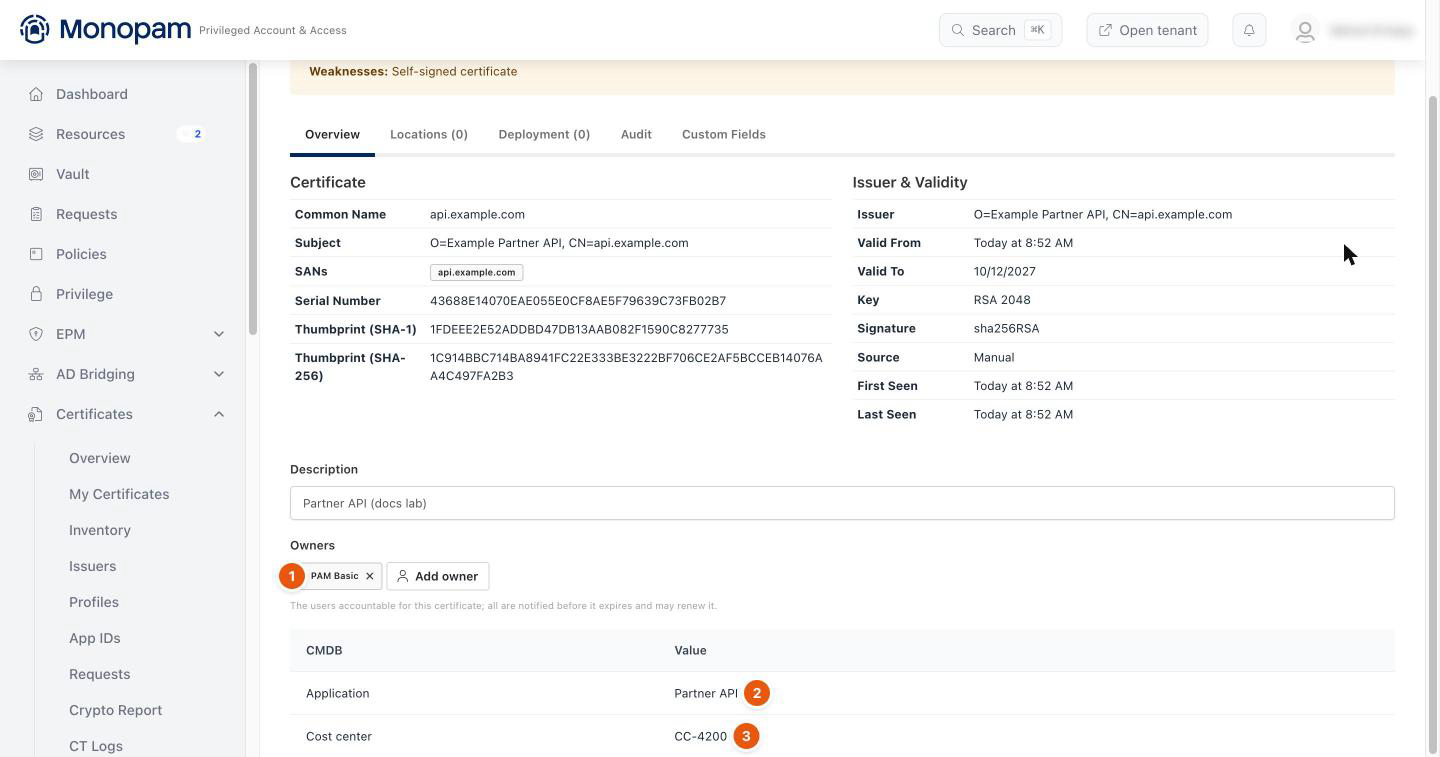
Figure 3. The certificate after the flow ran.
A certificate the CMDB does not know (HTTP 404) ends at Not in the CMDB with a Warning, and nothing is written on it.
Troubleshooting
What you see | Why | What to do |
|---|---|---|
The run says No Monopam user matches and the owner is not set. | The e-mail the CMDB returns belongs to no Monopam user. | Set the owner never creates a user. Check the address, or match on the field the CMDB actually returns (user name). |
Write a custom field fails. | The field type does not exist or does not apply to certificates. | Create it for Certificate under Custom Fields → New Field Type; the step finds it by its key or title. |
The flow did not run for a certificate. | The certificate was already in the inventory, or the flow is not published. | Only certificates new to the inventory trigger it. Check Flows for Not published. |
Related
- Call an API that needs a token
- Certificate inventory
- Scripts and flows