Many systems a flow talks to (a CMDB, an ITSM tool, an asset or change API) do not take a fixed key. They first want you to log in and get a short-lived access token, then expect that token on every call. A flow does this with two Ask an API steps: the first gets the token and keeps it in the run, the second sends it in the Authorization header and works with what comes back.
Applies to | Who can do this |
|---|---|
Monopam v2026.10 | Super administrators. Flows, Flow Runs and custom field types are only shown to them. |
Before you begin
- The API's token endpoint and the client ID and secret it accepts (OAuth 2.0 client credentials or a similar login).
- A vault item that holds them: put the client ID in Username and the secret in Password. The examples use a vault item named
cmdb-api-client. The secret is never typed into the flow. - The Monopam server must be able to reach the API over HTTP or HTTPS.
How the token travels from one step to the next
- Get a token is an Ask an API step that sends a POST to the token endpoint. Its body (1) takes the client ID and secret from the vault with
{{Vault.<vault item>.UserName}}and{{Vault.<vault item>.Password}}. Monopam fills them in at the moment the request leaves.{"client_id":"{{Vault.cmdb-api-client.UserName}}","client_secret":"{{Vault.cmdb-api-client.Password}}"} - Save the answer as (2) names the answer. With
auth, a JSON answer such as{"access_token":"…","token_type":"Bearer","expires_in":300}becomes the fieldsauth.json.access_token,auth.json.token_typeandauth.json.expires_in. The status code isauth.status, the raw answerauth.body, and a failure's reasonauth.error.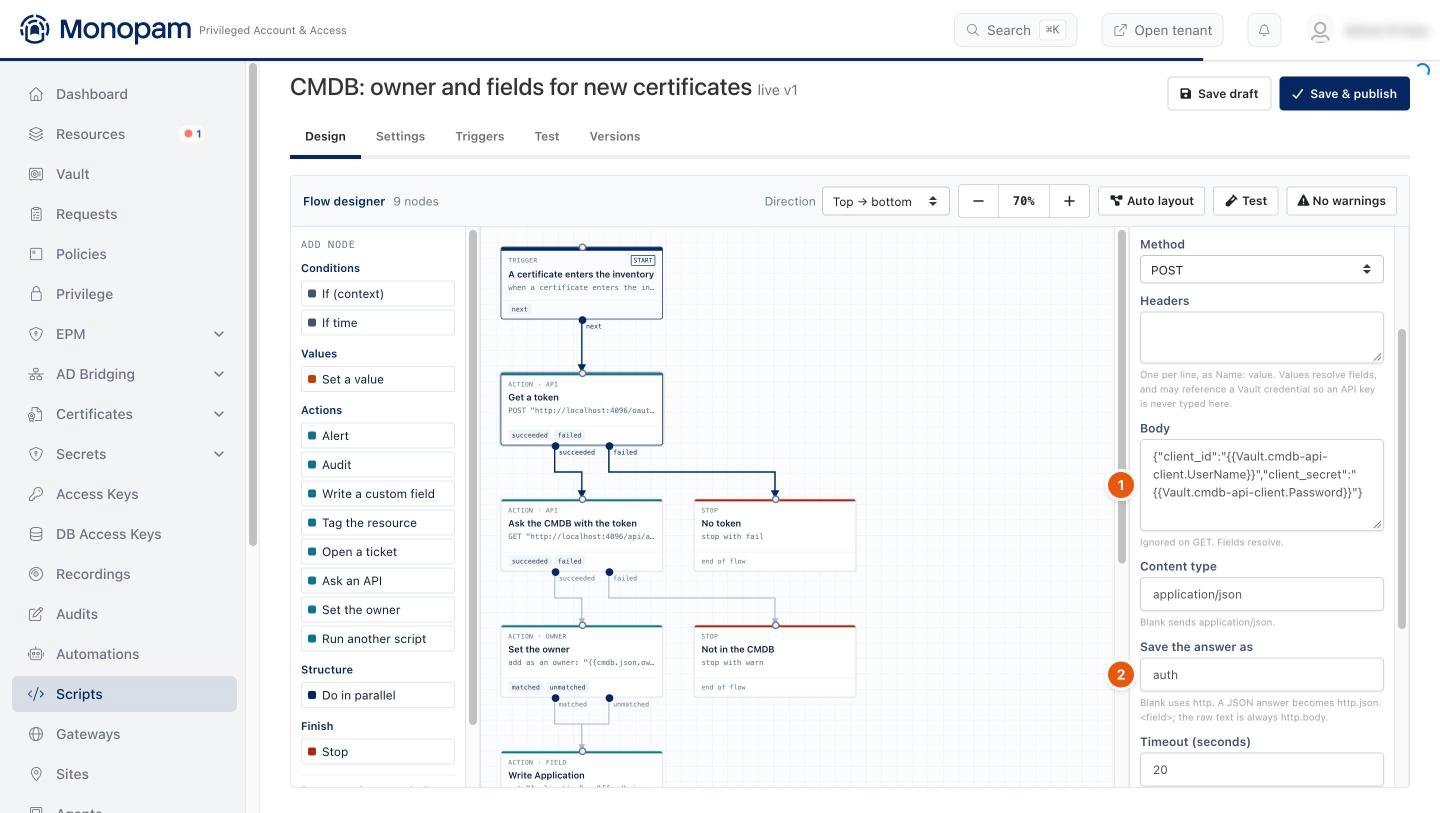
Figure 1. The token request. Nothing secret is typed into the flow.
- The next Ask an API step sends the token as a header (2):
Authorization: Bearer {{auth.json.access_token}}. Its URL (1) can use the event's fields, and it saves its own answer under another name (3), so the later steps can read, for example,cmdb.json.owner.email.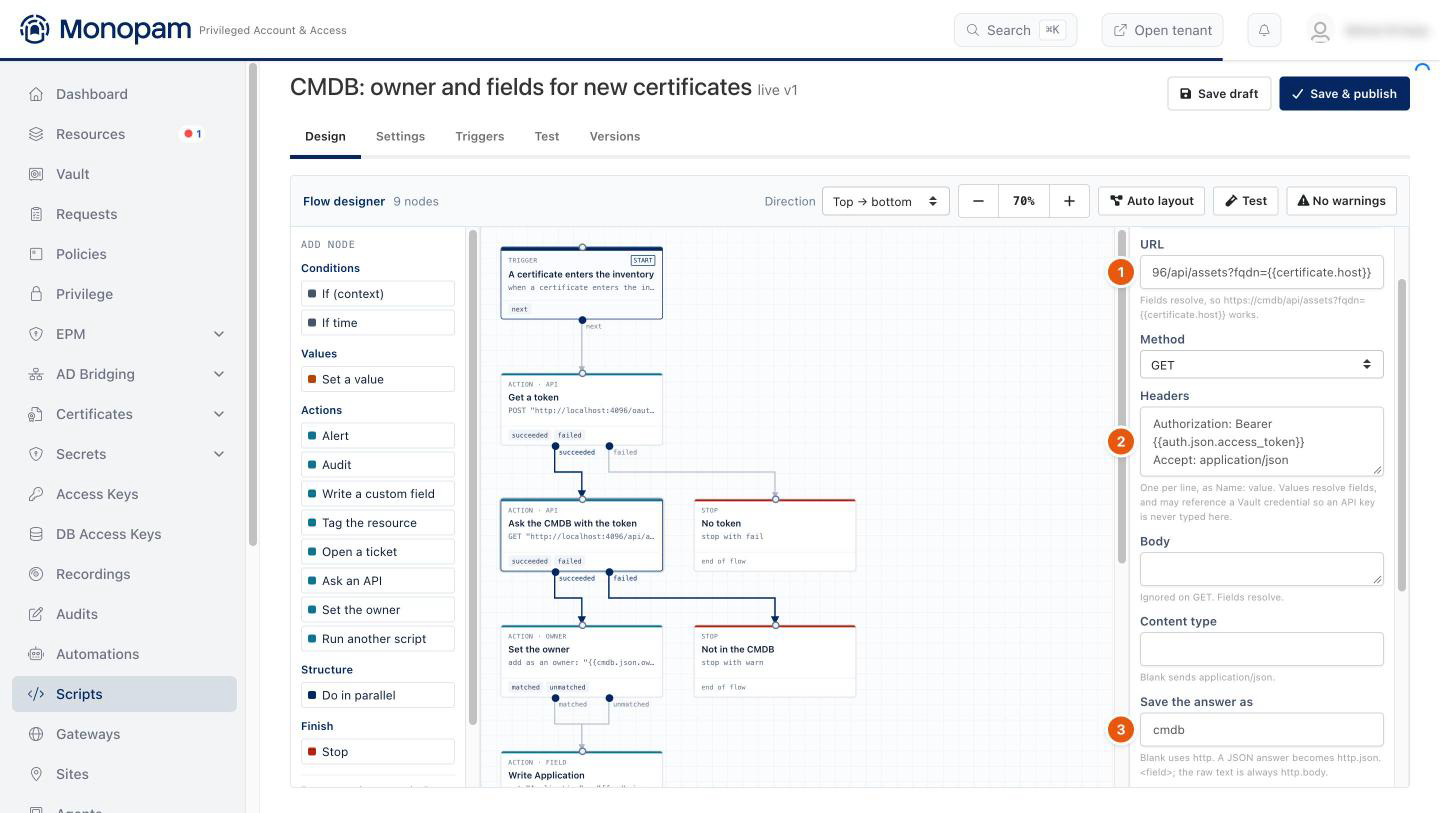
Figure 2. The token from the first step goes into the Authorization header.
- Each Ask an API step leaves through succeeded or failed. Connect failed to a Stop or an Alert, so a refused login or an API that is down is visible in Flow Runs.
The token stays inside the run. Flow Runs shows each step's status code and how many fields it produced, not the token. The run's stored values are encrypted. A new token is requested on every run, so an expired token is never reused.
Examples
Two complete flows built this way, each on its own page with the step list, the request bodies and the result:
- Find a certificate's owner in the CMDB: when a certificate enters the inventory, get a token, look the host up, add its owner to the certificate and write two CMDB fields into the certificate's custom fields.
- Open a change record after a password rotation: after a successful rotation, get a token, record the rotation as a change and write the change number on the vault item.
Other token endpoints
- Form-encoded OAuth 2.0 (
application/x-www-form-urlencoded): set Content type to that value and add:urlto each vault reference so special characters survive:grant_type=client_credentials&client_id={{Vault.cmdb-api-client.UserName:url}}&client_secret={{Vault.cmdb-api-client.Password:url}}. - A token field with another name: use the name the API returns, for example
{{auth.json.token}}or{{auth.json.data.accessToken}}. Nested objects are read with dots. - A fixed API key instead of a login: one Ask an API step is enough; put the key in a header as
X-Api-Key: {{Vault.<vault item>.Password}}. - Several systems in one flow: give each answer its own name (
auth,itsmauth,cmdb). Two steps saved under the same name overwrite each other.
Troubleshooting
What you see | Why | What to do |
|---|---|---|
Get a token fails with HTTP 401. | The token endpoint refused the client ID or secret. | Check the vault item's Username and Password, and that the reference names the item exactly ( |
The second step fails with HTTP 401. | The header did not carry the token: a typo in the field name, or the token endpoint names it differently. | Compare |
A step detail shows | The token step was saved under another name, or its answer was not JSON. | Use the same name as Save the answer as. A non-JSON answer is only readable as |
Related
- Scripts and flows
- Find a certificate's owner in the CMDB
- Open a change record after a password rotation