Monopam watches every certificate it knows about, managed or discovered, and warns you before one expires. This page covers who hears about it, when, on which channel, and in what words.
Where to set it up
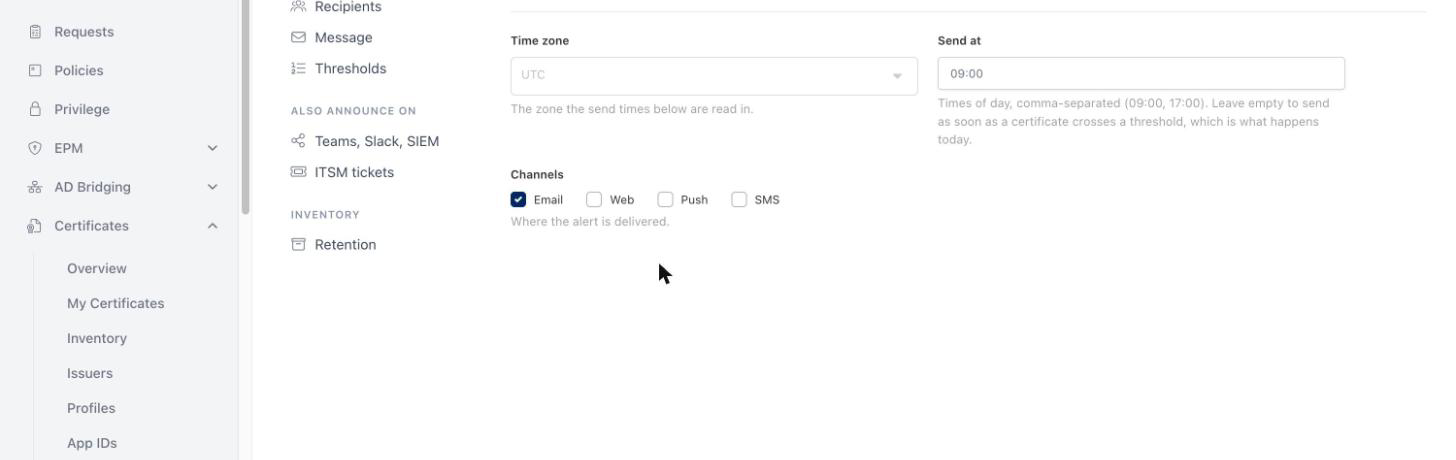
Certificates → Alert Settings. The page is a list of sections down the left. The first five are the expiry alert itself: Schedule (time zone, send times, channels), Recipients, Message, Thresholds and Scopes. Underneath them are the places an alert is also announced, and the inventory's retention.
The two layers
A threshold is a number of days left. When a certificate comes that close to expiry, an alert goes out.
Everything else about that alert comes from the three sections above it: the time zone and times of day on Schedule, the people on Recipients, the words on Message. A threshold uses the defaults unless you open Advanced on its row and change something, and then it changes only what you touched. That is how "the usual warning, except at three days" is expressed without repeating the parts that do not change.
Each threshold row shows a small badge for anything it overrides, so you can see at a glance which rows are special without opening them.
Different alerts for different certificates
Everything above applies to every certificate in the inventory. Scopes, the last section under Expiry alert, is where that stops being true: a scope is a rule over certificates plus the parts of the alert it changes for the ones it matches. "Anything under example.com goes to the portal team, at 09:00, in these words" is one scope.
A certificate no scope matches resolves exactly as it did before, which is why an installation that never opens the section keeps the alerts it has. Until you add one, the section says as much: Every certificate gets the same alert.
Writing the rule
Applies to a certificate when holds the rule. It is the same rule builder a certificate approval policy uses, matched by the same engine on the server, with the same operators, the same AND/OR groups and the same exceptions. A rule of Certificate · Host · ends with · example.com also catches *.example.com, because Host is read with the wildcard already stripped.
Exceptions, collapsed until you open it, is the other half of the rule: a certificate an exception matches is not in the scope, whatever the rule above it says.
A scope with no rule is refused when you save, by name: The scope 'Partner certificates' has no rule, so it would match nothing. Write a rule or remove it. That is deliberately the opposite of a policy, where no rules means every certificate: a scope with no rule would quietly redirect the whole installation's alerts. A scope needs a name for the same practical reason, and two scopes cannot share one, because the name is how a scope is recognised on the Message section.
What a scope changes
Under What it changes, anything you leave alone is inherited from the sections above. Each part behaves the way an alert forces it to:
| Part | Left empty | Set on the scope |
|---|---|---|
| Sends at | the times on Schedule | these times instead, for this scope's certificates |
| Time zone | the time zone on Schedule | this one, when this is the first matching scope that states one |
| Days before expiry | the days on Thresholds | these days instead of the default ones. A day that is also a threshold row keeps that row's own overrides rather than repeating them here |
| Channels | the channels on Schedule | these channels instead of them, which is what lets a scope narrow to mail alone |
| Recipients | the people on Recipients | Also send to these adds them to the ones already gathered; Send only to these narrows the alert to this list |
| Message | the default wording | this scope's own wording, written on the Message section under a tab carrying the scope's name |
Each card says what it changes underneath its name, so a list of scopes can be read without opening every one, and a scope can be turned off with Enabled instead of being deleted.
When several scopes match one certificate
All of them apply. What can be merged is merged: recipients, channels, send times and days. A time zone and a message cannot be, because an alert resolves to exactly one of each, so the first scope in the list that states one decides, and the arrows on each card reorder the list. Recipients fold in the same order: a scope that says Send only to these narrows what the scopes before it had gathered, and one that adds extends it.
Checking a scope before you rely on it
What does this match? counts the rule against the real inventory, on the server, with the engine that will match it when the alert is sent, and lists what it found with the days each certificate has left. A rule that reads correctly and catches nothing is otherwise discovered by a week of silence. The count covers the 500 certificates closest to expiry and says so when it had to stop there.
Send now on a scope card sends that scope's real alert, in that scope's wording, against the certificates its rule really matches, to you alone. If none of them is inside the scope's days, it says so rather than sending an empty mail.
What a scope does not decide
A scope decides the expiry alert and nothing else. Certificate Transparency alerts, failed renewals and failed deployments are sent to the default recipients however the scopes are written, and the section says so on screen.
When an alert goes out
Send at holds the times of day an alert may leave, read in the Time zone above it. Leave it empty and the alert goes out as soon as Monopam notices the certificate has crossed the threshold, whatever the hour. That is the behaviour of installations that have never set this.
With a send time configured, the rule is: the alert waits for a send time that comes round after the certificate entered the threshold. A certificate that reaches "7 days left" at two in the afternoon, on a 09:00 schedule, is reported the next morning, not that afternoon.
Repeat (under Advanced) decides whether that threshold speaks once or keeps speaking:
- Once per certificate is the default and the long-standing behaviour: each certificate raises each threshold once.
- Daily until it is renewed sends again at every send time while the certificate is still inside that threshold. It is meant for the tightest thresholds, where silence after one unread mail is the thing you are trying to avoid.
Who receives it
Three kinds of recipient, in any combination:
- Users of Monopam.
- Groups from Monosign. Add groups opens the same searchable, paged list the user picker uses. Membership is read again every time an alert is sent, so joiners and leavers are picked up without anyone editing this page, and a group that is later renamed keeps working because it is stored by its identity rather than its name. A group that has since been deleted is called out in red.
- Email addresses outside Monopam, one per line.
On top of those, Also notify the owners of the certificates in the alert adds each certificate's own owners to its own alert. It is on by default, and it is what lets a team hear about their certificates without being added to a global list.
A threshold that sets its own recipients chooses between two modes. Also send to these adds them to the default recipients; Send only to these narrows the alert to that list alone. The first is the default, deliberately: narrowing an audience is easy to do by accident and produces an alert that nobody reports because nobody receives it.
Which channels carry it
An alert can go out on any combination of Email, Web (the notification bell in the console), Push and SMS.
Push and SMS are delivered by Monosign, so they are available only when your Monosign has a channel of that name. When it does not, the box is shown disabled with the reason rather than hidden, so the absence is visible.
Push only reaches somebody who has a registered device. A recipient without one is sent the alert by mail instead, and the event log records that this is what happened. When mail is already one of the channels, they simply receive the mail and nothing is duplicated.
Teams, Slack, a generic webhook, SIEM and ITSM tickets are configured on their own tabs and are unaffected by any of this. They fire for every alert, independently.
The message
By default Monopam sends its built-in digest, which is the mail these alerts have always sent. You only have to think about this section if you want different wording.
Edit the message starts from the built-in text, so you are never writing into an empty box.
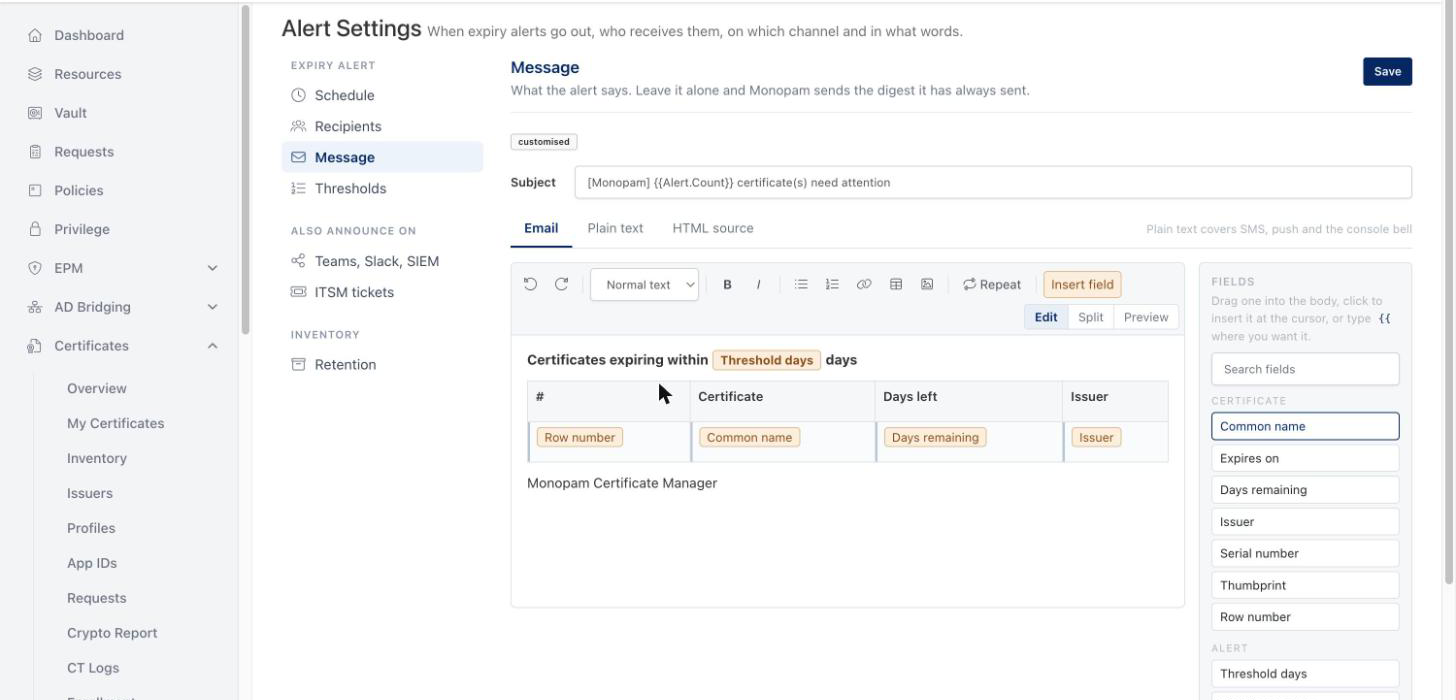
The editor is a plain writing surface with a few mail-safe controls: bold, italic, lists, links, headings and tables. Fonts, sizes and colours are deliberately absent, because those are what break in mail clients. Text pasted from a word processor arrives as text, without its hidden markup.
Fields are the values Monopam fills in when the alert is sent. Drag one in from the list on the right, click it to put it where the cursor is, or type {{ in the body and pick from the list that appears. A field is a single object: it cannot be half deleted, and the editor refuses to save a field that does not exist, naming it.
| Group | Fields |
|---|---|
| Certificate | Common name, Expires on, Days remaining, Issuer, Serial number, Thumbprint, Row number |
| Alert | Threshold days, Certificate count, Expired count, Certificate table, Console link |
| Recipient | Recipient name, Recipient email |
One rule follows from the fields themselves rather than from a setting: a message that names a certificate is sent once per certificate, because a sentence about one common name cannot describe twelve of them. A message that uses only Alert fields is a single digest covering all of them. The editor says which one you are writing, underneath the body.
Writing your own certificate list
There is a third thing you may want, and it is what Repeat on the toolbar is for: one digest, with the certificates laid out your way rather than in the built-in table. Mark the part of the message that should be written once per certificate, put Certificate fields inside it, and that part is repeated for each certificate in the alert while the rest of the message is written once.
Inside a table, Repeat marks the row the cursor is in: build the table with a header row and one body row, put the fields in the body row, and press Repeat there. The marked row is shaded. Anywhere else, Repeat draws a frame round the blocks that will be repeated, which is what you want for a bulleted list or a run of paragraphs.
Certificate fields inside a repeat do not turn the alert into one mail per certificate. That is the whole point of it, and the line under the body confirms which you are getting. Row number numbers the certificates as they are written out; they come in the same order as the built-in table, soonest to expire first.
Pictures
Paste a picture into the body, drop it in, or use the picture button on the toolbar. Monopam stores it and the message links to it, which is how every other mail with a picture in it works: a picture embedded in the message itself is refused by most mail clients, and your recipients would see nothing at all.
Two consequences worth knowing. Pictures are fetched by the recipient's mail client from your Monopam address, so an installation whose alerts are read from outside the network it runs on should have its public address configured, and one behind a reverse proxy has to let that one path through unauthenticated. And a picture may be at most 2 MB, in PNG, JPEG, GIF or WebP.
Two more tabs sit next to Email:
- Plain text is what SMS, push and the console bell carry, since none of them can show formatting. It is derived from the email body and stays in step with it, so there is only one message to maintain. Untick the box if you would rather write a shorter one by hand; the character count and the number of SMS parts are shown underneath.
- HTML source is the exact markup that is sent. It is there for the one case the writing surface cannot help with: a mail that renders badly in a particular client and has to be corrected by hand.
Testing it
Send now on a threshold row runs that threshold's real query, renders its real message, and sends the result to you alone. It does not change anything about the real alert: a certificate that has not been reported yet will still be reported on its own schedule.
If nothing is currently within that many days, it says so rather than sending an empty mail.
If you change nothing
Everything here is optional. An installation that never opens this page keeps exactly the alerts it has: the same thresholds, the same single digest, the same wording, the same recipients, sent as soon as a certificate crosses a threshold.
If something looks wrong
| What you see | What it usually means |
|---|---|
| The alert arrived in the middle of the night, not at the time we configured | That threshold has no send time of its own and the Defaults block has none either, so it goes out as soon as the certificate is noticed. Set Send at. |
| We set 09:00 and the alert came a day later than expected | The certificate crossed the threshold after that day's last send time, so it waited for the next one. This is the rule, not a fault. |
| A whole group stopped receiving alerts | The group has no members any more, or it was deleted in Monosign. Re-add it on this page; the message log records "resolved to no members". |
| One person never receives the push notification | They have no registered device. They receive the mail instead, and the log says so. |
| SMS cannot be ticked | Your Monosign has no SMS channel defined. The reason is shown next to the box. |
| Save is refused and names a field | The message uses a field Monopam cannot fill in, usually a typo. Insert the field from the list rather than typing it. |
| We received one mail per certificate instead of one list | The message uses a Certificate field outside a repeat, which makes it a per-certificate message. Put the field inside a repeat, or use the Alert fields and the built-in certificate table. |
| The picture in our alert is broken for everyone outside the office | The message points at the address the console was opened on. Set the installation's public address, then add the picture again so the stored address is rewritten. |
| Save is refused and says the image is pasted straight into the message | The picture was put into the HTML source tab as data rather than added in the editor. Paste it into the body instead. |
| Somebody who left the company still received the alert | Their Monopam account is still enabled, or their address is typed into Email addresses directly. A disabled account is skipped. |
| Our scope sends to nobody | The rule matches nothing. ends with on the common name does not catch a wildcard certificate, which is what Host is for. Press What does this match?; it counts against the real inventory. |
| Two scopes matched one certificate and we expected only the narrower one | Every matching scope applies; that is the rule. Only the time zone and the message come from one of them, the first in the list. |
| Save is refused and says a scope has no rule | A scope with no rule would match nothing, so it is never saved as a scope that quietly matches everything. Write the rule, or remove the scope. |
| A scope's certificates are not alerted on the longer day it asks for | An installation older than this feature read certificates only as far as the widest default threshold. After updating, the sweep covers the widest day any scope alerts on. |