A Vault Access Policy decides who may reveal or copy which fields of which vault items, whether they may edit them, and whether a reveal needs approval first.
Applies to | Who can do this |
|---|---|
Monopam v2026.10 | Administrators with permission to manage policies. |
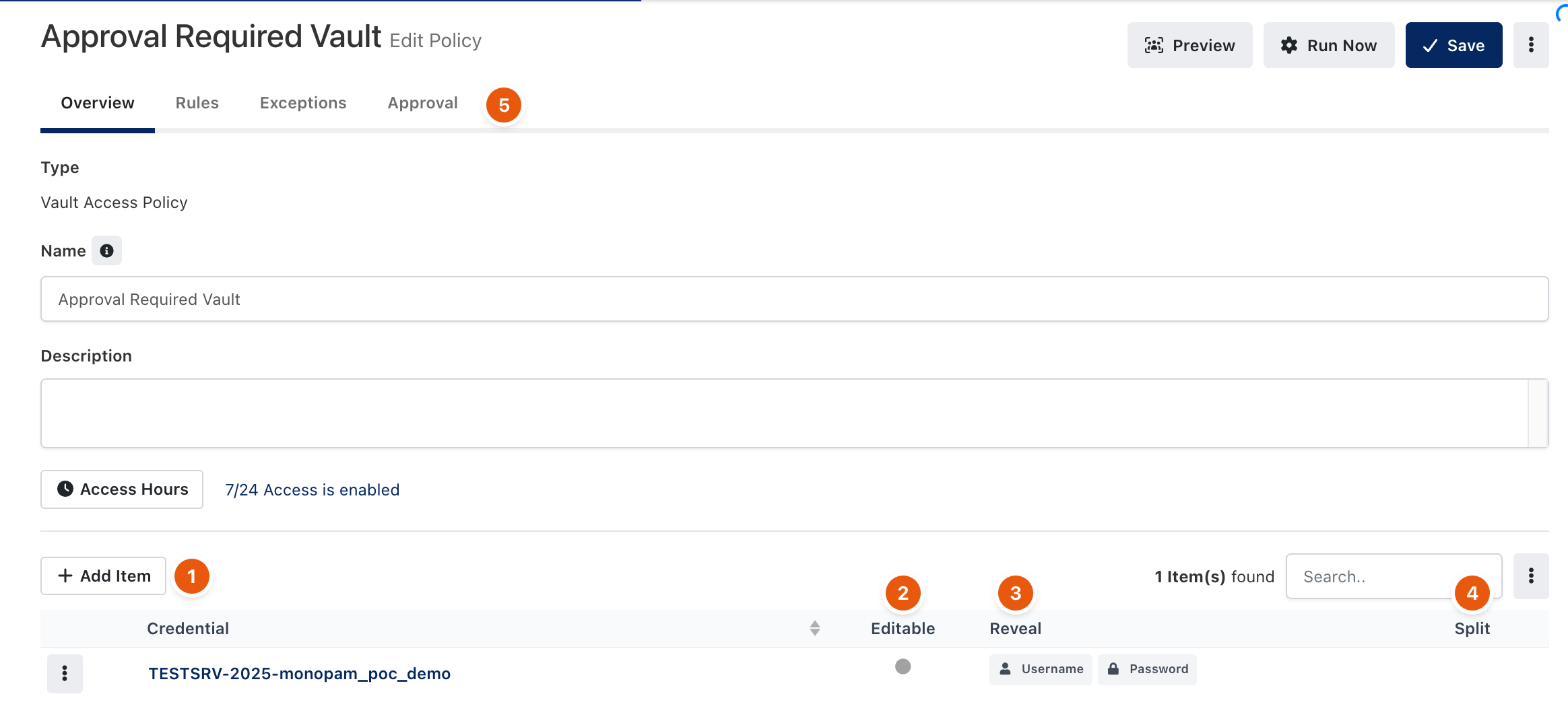
Figure 1. A Vault Access Policy.
- Open Policies → Add New → Advanced and choose Vault Access Policy. Enter a name and, if needed, limit Access Hours.
- Click Add Item (1) for each vault item the policy covers.
- For each item, decide whether it is Editable (2), which fields may be revealed (Reveal, 3), and whether a field is Split (4): split into parts, each part owned by different people, so no single person sees the whole secret.
- On the Rules tab, decide who the policy applies to. On the Approval tab (5), choose Required to make every reveal go through Requests.
- Click Save.
When approval is required, the reveal button opens a request instead of showing the value. Once approved, the field can be revealed for the requested window. Every reveal and copy is written to the audit log.
Troubleshooting
What you see | Why | What to do |
|---|---|---|
A user sees | No Vault Access Policy lets the user reveal that field. | Add the field to Reveal in a policy that matches the user. |
Vault item is locked! You can't reveal any data from it. | The item is locked. | An administrator releases it with Lock / Release in the Vault list. |
Related
- Vault items
- Approve and revoke access
- How policies work