Before you can manage a certificate you have to know it exists. A resource scan reads a machine or an appliance you have already registered and lists every certificate it holds, including the ones nothing is bound to and nobody remembers installing. It is read-only, it never touches private keys, and what it finds waits in a queue until somebody decides.
| What it answers | What is on that box already, what it serves, and when it expires |
|---|---|
| What it reads | A Windows server's machine stores and IIS bindings, a Linux or macOS server's certificate files and Java keystores, a Kubernetes cluster's TLS secrets, and the certificate stores of F5 BIG-IP, Citrix NetScaler, FortiManager, FortiGate and Panorama / PAN-OS |
| What it writes | Nothing on the device. A scan is read-only on every family |
| What it never collects | Private keys. An imported finding is a certificate without a key until you give it one |
| Where it runs from | An appliance is called from the Monopam server itself; a host is reached through a gateway or the server's own agent |
Before you start
- The machine or appliance is registered under Resources, with its address in the Server field. An appliance's management port goes there too, as
host:port, otherwise 443 is used. - For an appliance, the Monopam server can reach that management address. A scan does not go through a gateway.
- You have the permission to run a scan and to import a finding. An operator who may only read sees the findings and not the decision buttons.
Run one
Go to Certificates → Resource Scan and press Scan a resource.
- Device Type first. It decides which resources the picker then offers, and nothing else appears until it is chosen. It is deliberately not preselected: a guessed type would silently hide the resource you are looking for.
- Resource. The registered machine or appliance. Its Server field is the address the scan uses.
- Credential, where the family needs one. A Windows host with an agent needs none, because the agent already runs there as an identity that can read the machine store.
- Leave Import everything new straight into the inventory off unless you have a reason. A device store also holds CA bundles and the appliance's own certificate, and importing those gives you an inventory full of rows nobody asked for.
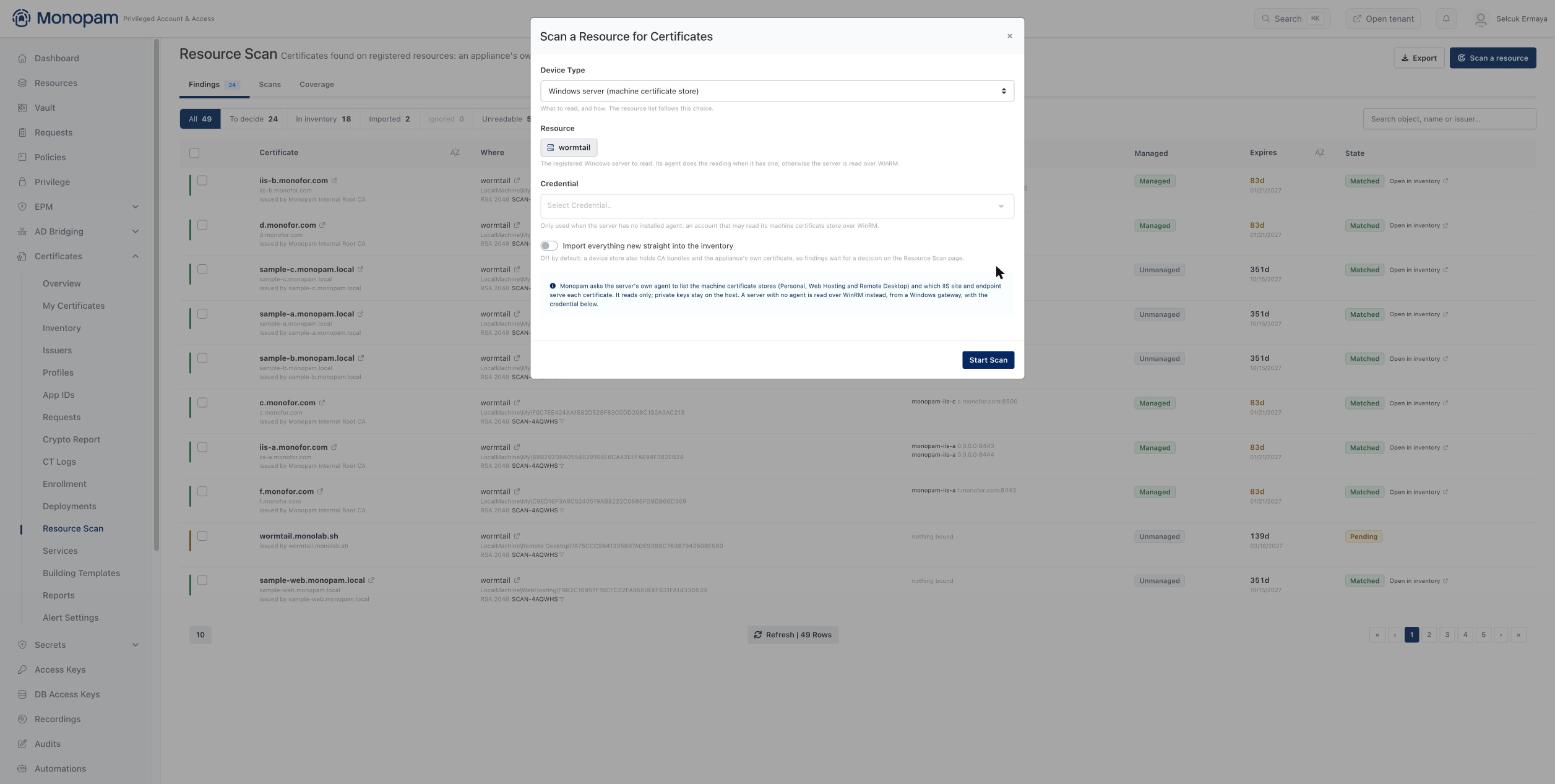
The scan dialog. A Windows server with an agent needs no credential.
The run happens in the background. Its row lands on the Scans tab with what it found, and the findings themselves on Findings.
What each family gives you
| Device Type | What is read | What "used by" shows | Importable |
|---|---|---|---|
| Windows server (machine certificate store) | LocalMachine\My, LocalMachine\WebHosting and LocalMachine\Remote Desktop | The IIS site and the endpoint that serves it | Yes |
| Linux / macOS server (files over SSH) | Certificate files and Java keystores under a bounded set of paths | The file it was found in | Yes |
| Kubernetes cluster | kubernetes.io/tls secrets, through kubectl on a reachable host | The namespace and secret, and the Ingress using it | Yes |
| F5 BIG-IP | Every certificate object in the filestore | The client-SSL and server-SSL profiles, and the virtual servers those front | Yes, when the management account can read the filestore |
| Citrix NetScaler ADC | Every sslcertkey and its file | The SSL virtual servers it is bound to | Yes |
| Fortinet FortiManager / FortiGate | The ADOM store, and a device's VDOM store | The SSL inspection profiles using it | Yes |
| Palo Alto Panorama / PAN-OS | All four config scopes: Panorama's own, shared, per-vsys and template | The SSL/TLS service profiles | Yes |
Three deployment targets have no scan: Symantec SSL Visibility, Azure Key Vault and AWS Certificate Manager. A certificate can be pushed to those and not read back.
Windows servers and IIS
This is the family most people start with, because an IIS estate accumulates certificates faster than anyone documents them.
The scan reads three machine stores. Personal (LocalMachine\My) is where a server certificate normally lives, Web Hosting (LocalMachine\WebHosting) is where IIS puts them when a site is created with that option, and Remote Desktop is included because the RDP listener's certificate is one a privileged-access product most needs to know about. The trust stores are skipped on purpose: a machine's list of trusted roots is not an inventory of what that machine serves.
It then resolves what each certificate actually serves. IIS keeps that in two places and Monopam reads both: netsh http show sslcert knows which certificate answers on which endpoint, and appcmd knows which site owns that endpoint. Site names come from appcmd rather than the WebAdministration PowerShell module, because that module will not load on a server whose execution policy blocks scripts, which is the default on a hardened one, and its absence would quietly cost you every site name.
What that looks like on a server with several sites:
| Certificate | Used by | What it means |
|---|---|---|
a.example.com | site-a 0.0.0.0:8443site-a 0.0.0.0:8444 | One certificate serving two ports. Both are listed, not just the first |
b.example.com | site-b b.example.com:8446 | A hostname binding (IIS calls it SNI). http.sys keys it by hostname and port rather than by address and port |
c.example.com | site-c c.example.com:8500 | Two hostnames sharing one site and one port, each with its own certificate. They are reported separately, which is the whole point of reading http.sys rather than guessing from the site list |
d.example.com | site-c d.example.com:8500 | |
old.example.com | nothing bound | Installed, serving no traffic. Usually last year's certificate, or one imported for a migration that never happened |
The nothing bound rows are the ones worth reading first. They cost nothing to remove and they are the rows that make an expiry report lie, because an alert about a certificate nobody serves wastes somebody's morning every time it fires.
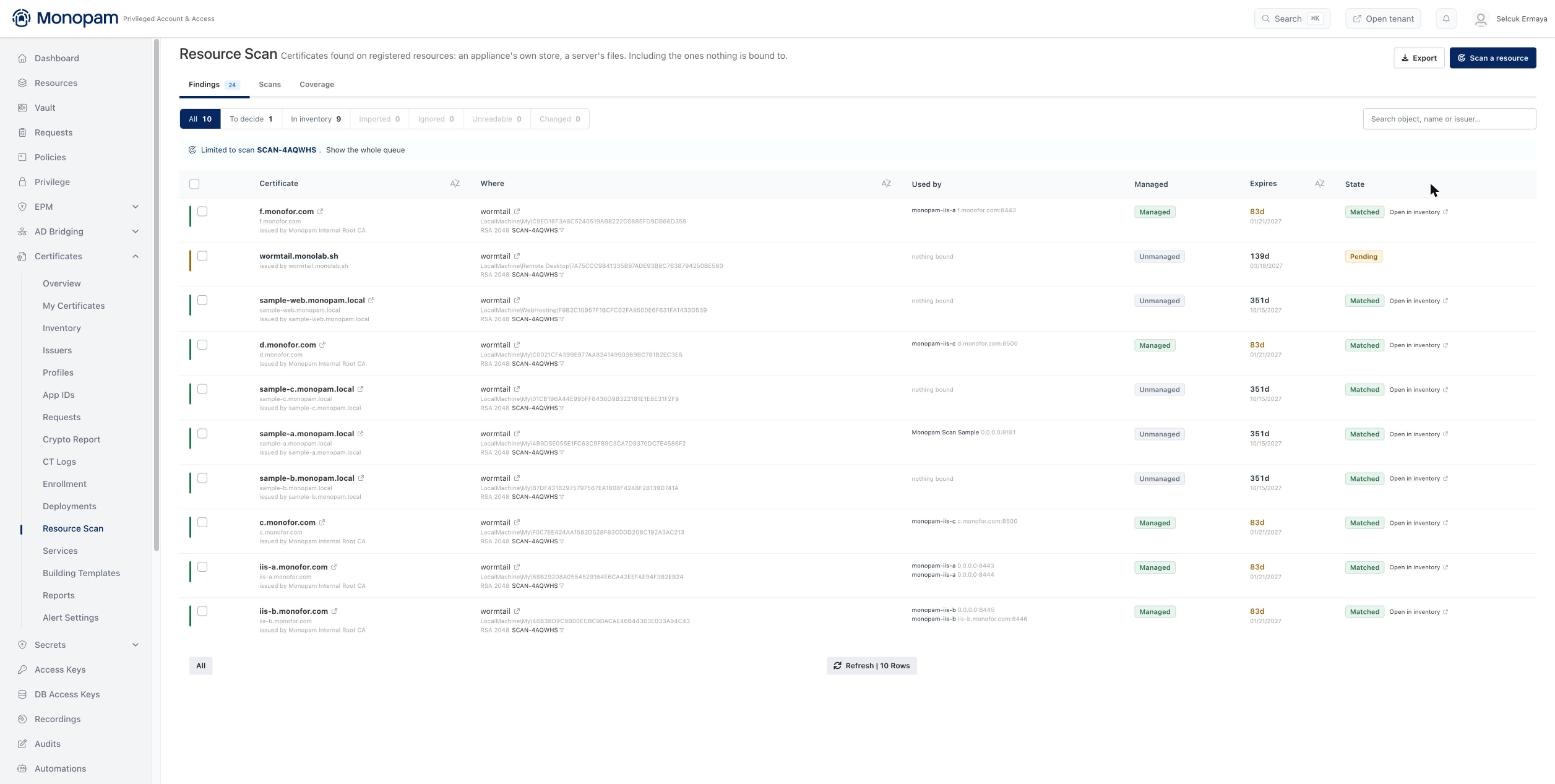
One Windows server, ten certificates. "Used by" is what the server really serves, read from http.sys.
With an agent, or without one. A Windows server with the Monofor agent is read through it and the scan asks for no credential: the agent already runs there as an identity that can read the machine store. A server without one is read over WinRM from a Windows gateway, with a credential you pick on the scan. The script is identical either way, so a finding does not depend on how the server was reached.
The agentless path needs the gateway itself to be running on Windows, because WSMan is not available to the PowerShell host on Linux. If the gateway that serves this server runs on Linux or in a container, the scan says so plainly rather than failing with a PowerShell error, and the answer is either a Windows gateway or the agent.
Reading the findings
Every finding is one certificate on one resource. The same certificate on three machines is three findings, because each is a separate place it has to be renewed. The segments across the top of Findings are the whole decision model:
| Segment | What it holds |
|---|---|
| To decide | Monopam has not seen this certificate before. Import it or ignore it |
| In inventory | Already known. The scan recorded a sighting on that resource and moved on |
| Imported | Brought into the inventory from this queue |
| Ignored | Deliberately passed over. A re-scan will not ask again unless the certificate on the device changes |
| Unreadable | The device listed the object but would not hand over the certificate. The row says why |
| Changed | Something replaced the certificate that used to be in that slot. Worth looking at: it is either a renewal somebody did by hand, or a change nobody approved |
The Managed and Unmanaged chip says whether Monopam holds a private key for that certificate, which is the difference between one it can renew and one it can only watch expire.
Deciding
An imported certificate becomes a Discovered inventory row with no private key. It counts for expiry alerting and reporting straight away, which is usually the reason to import it at all. To take it further and have Monopam renew it, give it a key: import the PFX in Inventory → Import, or issue a fresh certificate through an issuer and deploy that instead.
Ignoring is not deletion. The certificate stays exactly where it is on the device; Monopam just stops asking you about it.
Re-scanning
Run a scan again whenever you want. It does not re-raise what you have already decided: an ignored object stays ignored and an imported one stays imported, unless the certificate in that slot has actually been replaced, in which case the old verdict is cleared and what is there now goes back in the queue.
To do it on a schedule, add the resource to a Certificate Discovery policy. The same scan then runs on that policy's schedule, alongside or instead of its network endpoints, and each run gets its own row on the Scans tab.
Coverage
The Coverage tab answers the question behind the whole feature: not what the scans found, but what they never looked at. It lists the registered resources a scan has read and the ones it never has, so a machine that has quietly been outside the inventory since the day it was built shows up as a gap rather than as silence.
Limits
- At most 2000 certificate objects from one device in one scan. A device above that is covered only in part, and the run says so instead of truncating quietly.
- 30 seconds per management call and 10 minutes per scan. A device that accepts the connection and then stops answering ends as a failed run naming the timeout, rather than staying "Running" and locking that device against being scanned again.
- Private keys are never read, on any family.
If something goes wrong
| What you see | What it means |
|---|---|
| The resource I want is not in the picker | Its resource type does not match the Device Type. Choose the type first; an appliance has to be registered with the Appliance type |
| The scan hit the wrong port | The port comes from the resource's Server field. Write it as host:port, or leave it off for 443 |
| An agentless Windows scan says the gateway must run on Windows | WSMan is not available to the PowerShell host on Linux. Use a Windows gateway for that server, or install the agent |
| A finding says the certificate could not be read | That one object's file could not be collected. The row names the reason; the rest of the run is unaffected |
| Every F5 finding is unreadable | The management account has no shell on the appliance, and the certificate content comes from the file utility. Use an account that has one |
| The run says the device holds more than 2000 | The per-scan cap. That device is covered in part; there is no setting that raises it |
| The run failed with "did not finish within" | The device accepted the connection and then stopped answering. Check that its management interface responds promptly from the Monopam server, then scan again |
| It says "1 imported" and nobody approved anything | Import everything new straight into the inventory was on, either on the scan or on the policy's row for that resource |
| The same certificate appears several times | It is on several devices. A finding is per resource, and each one is a place it has to be renewed. The "On the device" column names which |
| An imported certificate cannot be deployed or renewed | A scan never reads private keys. Import the PFX for it, or issue a new certificate through an issuer |
What a scan does not do
- It does not change anything on the device. Not the certificate, not a binding, not a configuration.
- It does not read private keys, so what it imports can be watched but not renewed until a key is supplied.
- It does not reach an appliance the Monopam server cannot reach. Appliances are called from the server, not from a gateway.
- It does not read a Windows user's personal certificate store. The agent reads the machine store as the identity it runs as; a certificate in a person's store belongs to that person.
- It does not read the trust stores, on any family. What a machine trusts is not what a machine serves.
Monopam Certificate Manager. Names, addresses and certificates in the examples are illustrations.