Requests is the single inbox for every approval in Monopam. Each request is one row for the requester and one row per approver; the approved request itself is the grant, with its time window.
Applies to | Who can do this |
|---|---|
Monopam v2026.10 | Every user sees Mine. Everyone needs the |
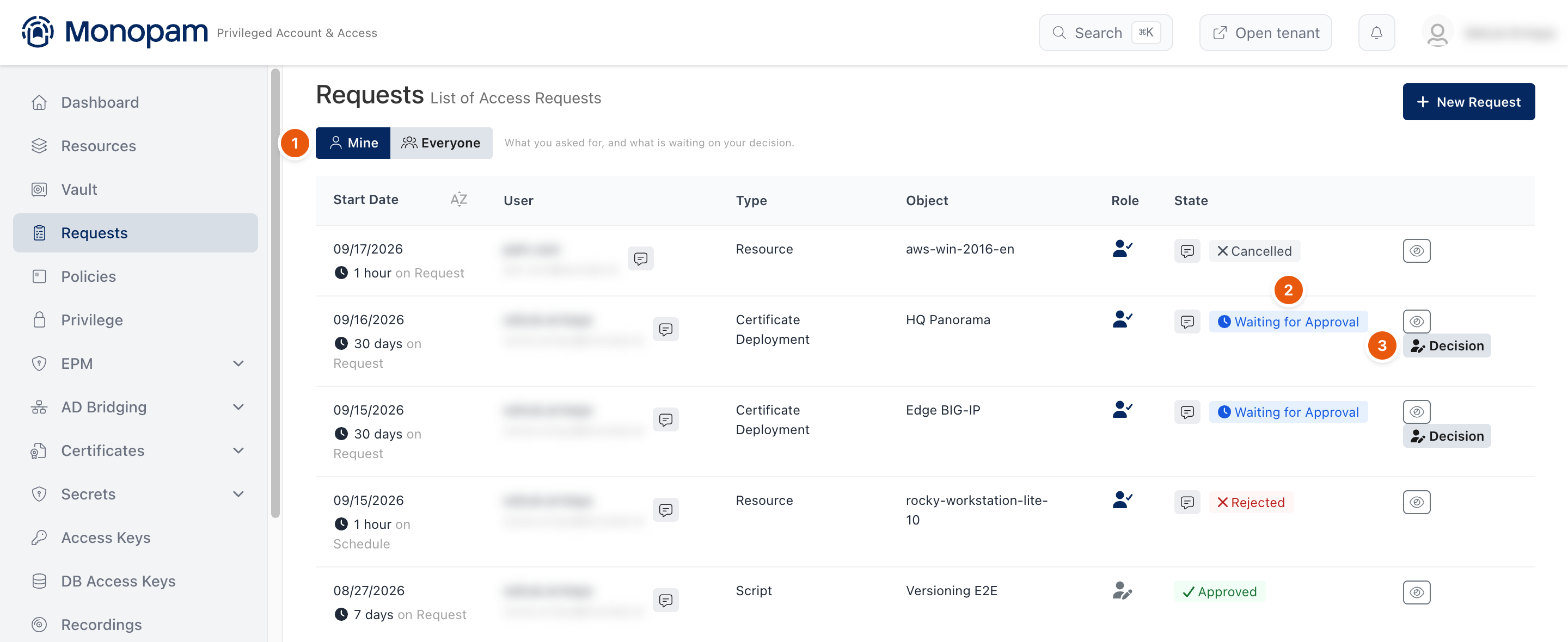
Figure 1. The Requests page.
Column | Shows |
|---|---|
Start Date | When the window opens, with its length and whether it starts on Request (when approved) or on Schedule. |
User | The requester. The speech bubble shows the requester's description. |
Type | The kind of object: Resource, Credential, Certificate, Certificate Deployment, Script, Vendor and others. |
Object | The object's name, linked to its page where one exists. |
Role | Whether you are the requester or an approver on this row. |
State | Waiting for Approval, Approved, Rejected, Cancelled, Waiting for Service or Completed. No approver marks a request nobody was named to decide. |
Actions on a row
Button | Who | What it does |
|---|---|---|
Decision | Approver | Approve or reject. See Approve and revoke access. |
Cancel | Requester | Withdraws a request that is still waiting. |
Revoke | Approver or administrator | Ends an approved grant early and closes live sessions opened under it. |
Decide | Super administrator | Decides a request that names no approver, or overrides one in the Everyone scope. |
What can be requested
Request type | Raised when |
|---|---|
Direct Connection, Scheduled Connection | A user connects to a resource that requires approval. |
Vault Access | A user reveals a field whose policy requires approval. |
Privileged Command | A shell command is held by a privileged command rule. |
Database Query | A database statement is held by Database Rules. |
EPM Execution | An endpoint asks to run an application elevated. |
Certificate Issuance, Certificate Renewal | A certificate operation needs approval. |
Script Publish, Script Execution | A script version is published or run under an approval gate. |
Temporary AD Access | A user asks for time-limited access through AD Bridging. |
External User Invitation, External Access Review | Vendors and external users are invited or reviewed. |
Related
- Request access
- Approve and revoke access
- Request Policy