A Discovery Policy finds machines and accounts on a schedule and decides what happens to them: onboard machines as resources, queue accounts for a person to decide, or import them into the vault with password reset and rotation.
Applies to | Who can do this |
|---|---|
Monopam v2026.10 | Administrators with permission to manage policies. |
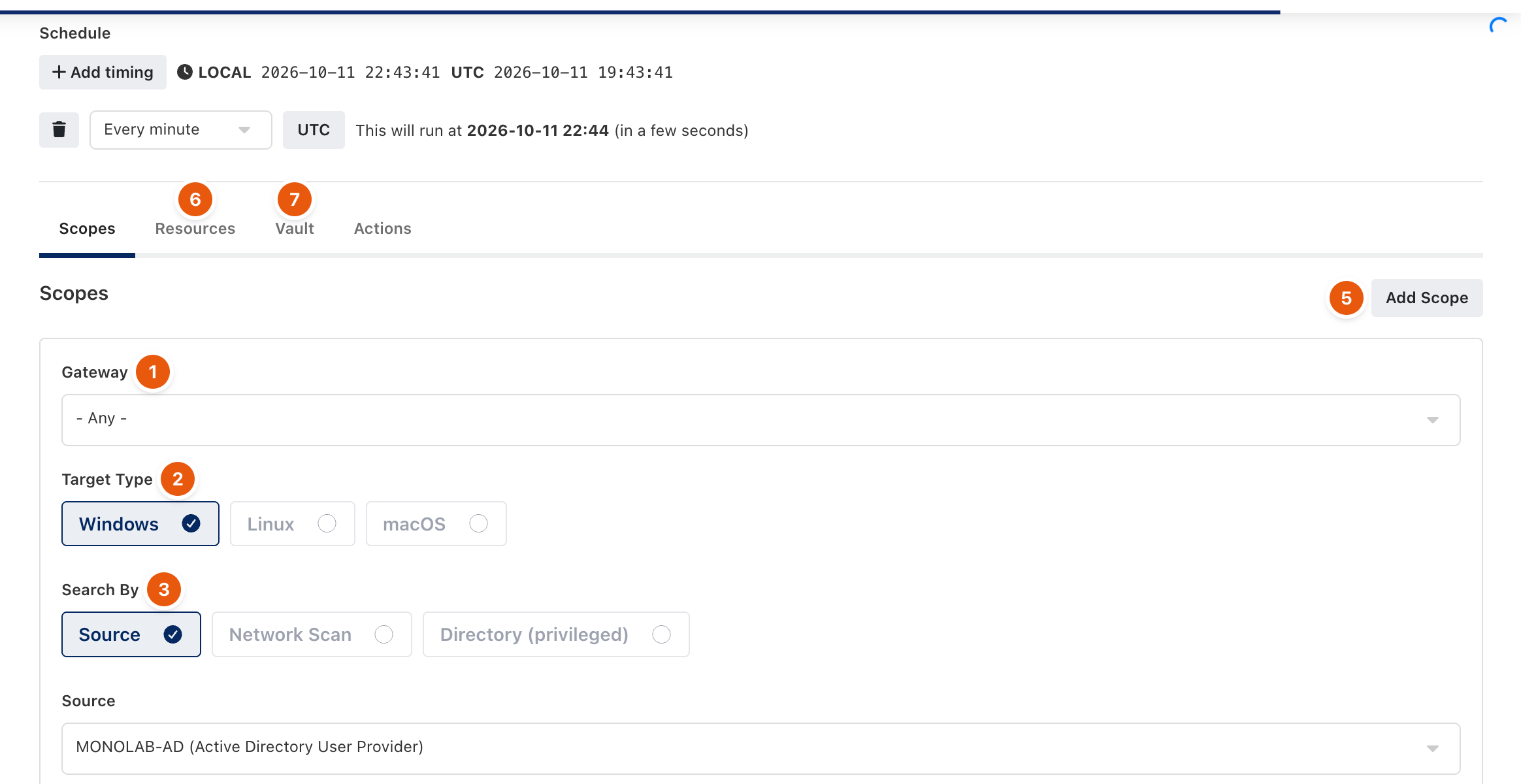
Figure 1. A Discovery Policy. Run Now starts it at once.
Overview
Name the policy, keep it Active and set the Schedule with Add timing. Preview shows what the scope would find; Run Now starts a run immediately.
Scopes: where to look
Field | Meaning |
|---|---|
Gateway (1) | The gateway that runs the search, or Any. |
Target Type (2) | Windows, Linux or macOS. |
Search By (3) | Source: machines listed by a directory or cloud source. Network Scan: the gateway probes an address range and onboards hosts that answer. Directory (privileged): privileged accounts in a directory. |
Source | The directory or cloud source to read. |
Filter | Optional. Directory sources search computers with this text; cloud sources keep only servers whose name contains it. |
Add Scope (5) adds another place to look.
Resources (6)
Filter by Rule decides which hosts are onboarded. With no rule a Network Scan onboards every host that answered, while a Source scope onboards nothing.
Vault (7)
- Discover Local Accounts reads the local accounts of the machines the scope reached, through the endpoint agent or the gateway's SSH path.
- Exclude Built-in Accounts, Include Service Accounts, Include Scheduled Task Accounts and Include Application Pool Accounts widen or narrow the search.
- Filter by Rule picks the accounts the policy acts on. With no rule nothing is imported automatically; in queue mode every account found is recorded.
Actions
- Queue discovered accounts for approval records findings in Discovered accounts instead of importing them automatically.
- Reset Account's Passwords while importing, a password policy, a Rotation Policy and a Vault Access Policy apply to imported accounts.
- Assign Privilege Credential and tags apply to onboarded resources.
- Run initial script on newly discovered servers runs a bootstrap script once, for example to create a service account or install an agent.
Related
- Discovered accounts
- Sources and cloud providers
- Scripts and flows