A gateway opens every session to your resources: RDP, SSH, VNC, Telnet and SFTP, the database proxy, the Kubernetes listener and the SSH bastion. It also records sessions and runs password changes and scripts on targets. Install at least one gateway in each network that holds resources.
Applies to | Who can do this |
|---|---|
Monopam v2026.10 | Administrators with permission to manage gateways. |
The Gateways page
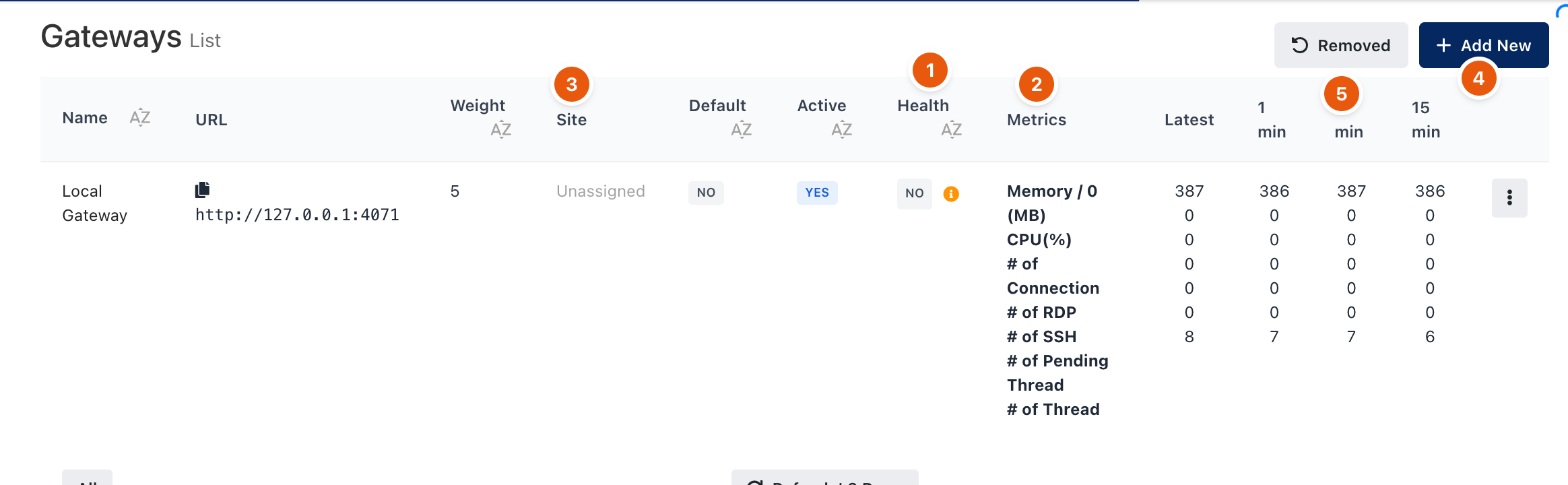
Figure 1. A gateway with its health and load.
# | Column or button | Meaning |
|---|---|---|
1 | Health | The result of the gateway's last health check. The information icon shows which checks failed. |
2 | Metrics | Memory, CPU, open connections, RDP and SSH sessions and threads, latest and averaged over 1, 5 and 15 minutes. |
3 | Site | The location the gateway belongs to, or Unassigned. |
4 | Add New | Creates a gateway record and shows how to install it. |
5 | Removed | Gateways that were removed, with the option to restore them. |
Weight decides how sessions are spread when several gateways can serve a resource; Default and Active show whether the gateway is the default and whether it takes sessions.
Add and install a gateway
- Click Add New, enter a Name, the gateway's Url (1) as Monopam reaches it, a Weight (2) and, optionally, a Site (3). Click Save.
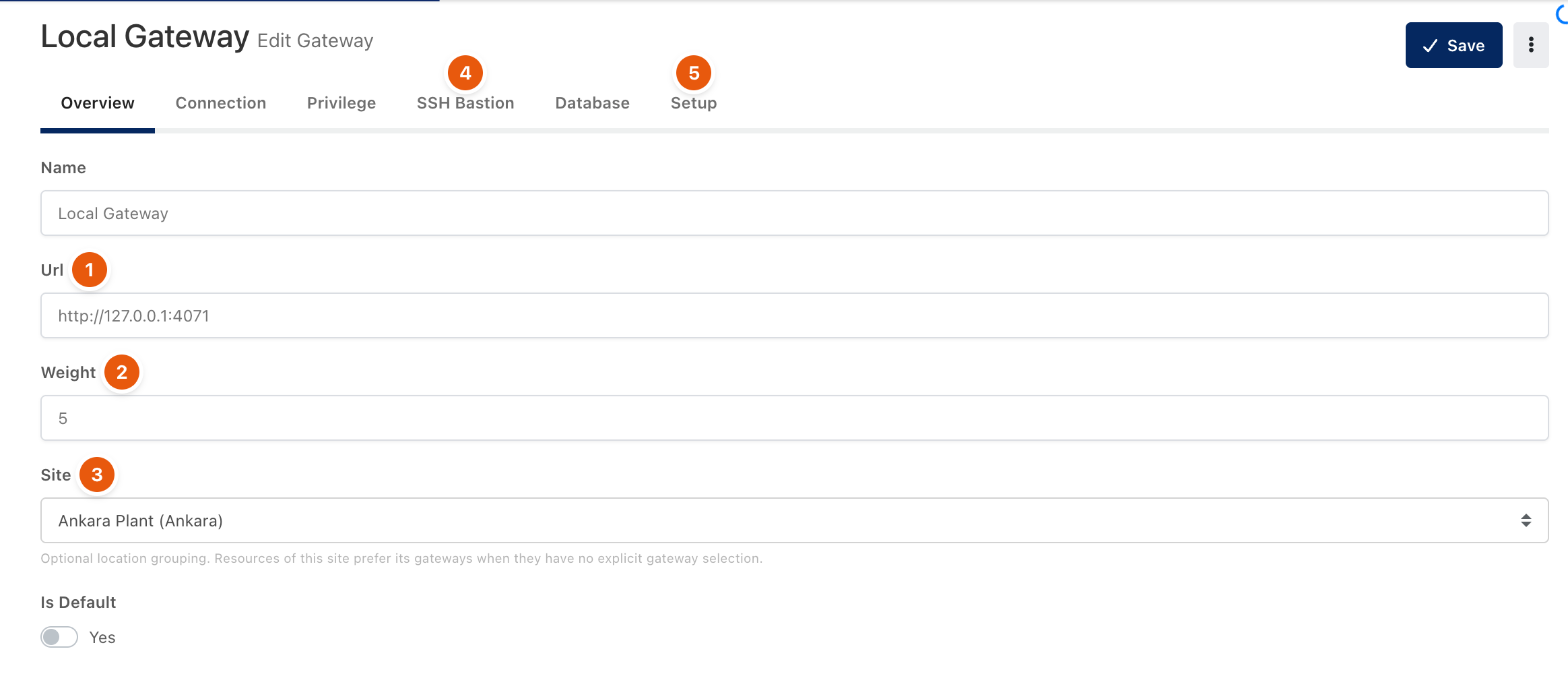
Figure 2. The gateway's Overview tab.
- Open the Setup tab (5 in Figure 2). Under Guided Installation, copy the script (4) and run it on the gateway server in a command line opened as Administrator. Turn on I'm using a self-signed certificate (3) if Monopam's certificate is not trusted by the server. Manual Installation (2) lists the steps for installing without the script.
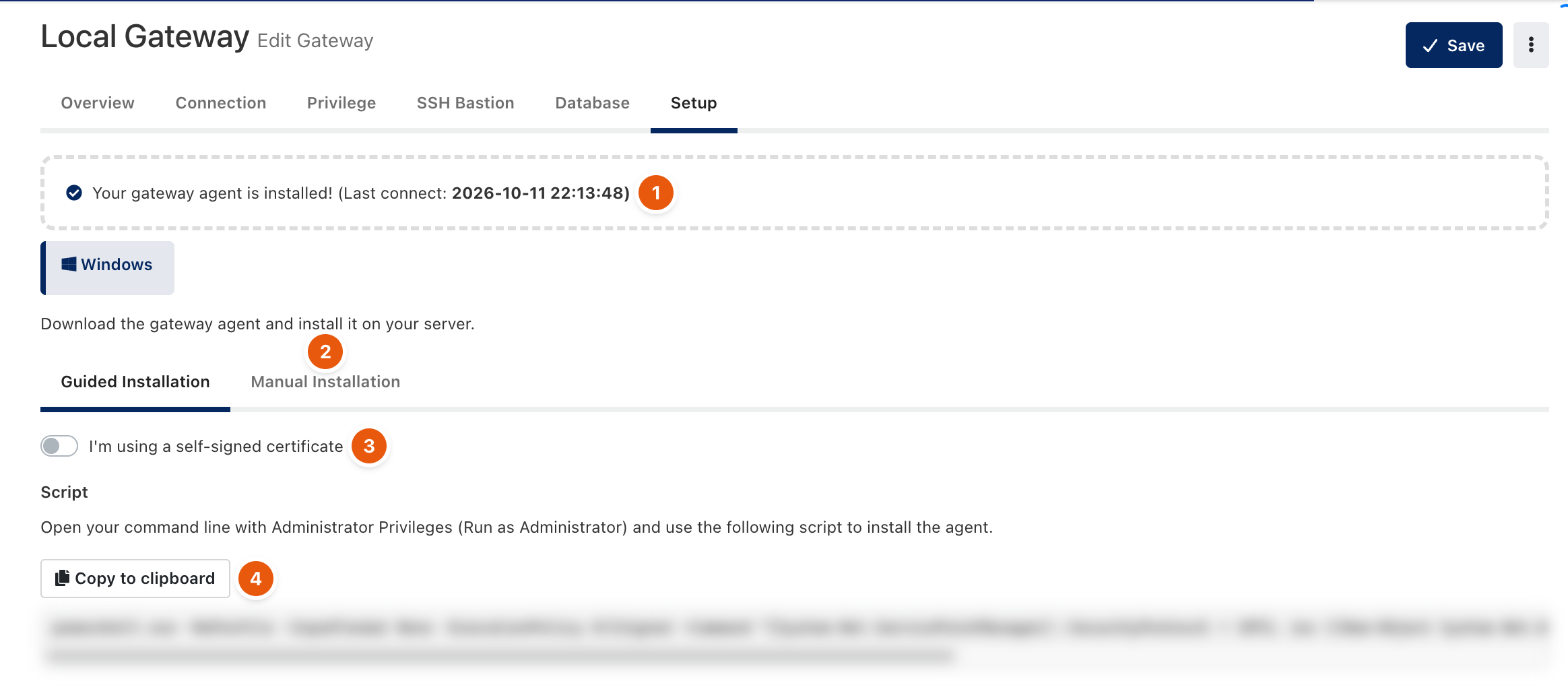
Figure 3. Installing the gateway. The script is blurred because it contains the gateway's key.
- When the gateway connects, the Setup tab shows Your gateway agent is installed! with the last connection time (1).
Gateways can also run on Linux and as a container. Container gateways are configured with MONOPAM_GW_* environment variables; see the Installation Guide.
Other tabs
Tab | Holds |
|---|---|
Connection | Connection settings for sessions through this gateway. |
Privilege | Settings for privileged operations the gateway runs, such as password changes. |
SSH Bastion | The native SSH server users connect to with their own SSH client. See SSH bastion. |
Database | The database proxy the gateway supervises. See Database clients through the Database Proxy. |
Troubleshooting
What you see | Why | What to do |
|---|---|---|
A task was canceled when connecting, or sessions never start. | Monopam cannot reach the gateway at its Url. | Check the Url on the Overview tab and that the gateway's port is open from the Monopam server. |
Health shows NO. | One of the gateway's health checks failed. | Open the information icon to see which check failed. |
Related
- Sites
- Agents
- Add a resource