A deployment target on a Linux or macOS host does its work in one of two places: inside the host, through the Monofor agent installed on it, or from a gateway, over an SSH session. Which one it uses, and which account the work runs as, are decided by three fields on the target: Transport, Credential and Run as user. A macOS keychain target has two more that depend on them: Keychain and Keychain password. This page is about how those fields fit together.
Applies to | Who can do this |
|---|---|
Monopam v2026.10 | Administrators with permission to deploy certificates. |
It covers the host types: Linux nginx, Linux Apache, Linux generic, macOS Keychain, macOS generic and Kubernetes TLS Secret. Windows targets always use the agent and have no Transport field; appliance and cloud targets are called over their own management API and never touch a host.
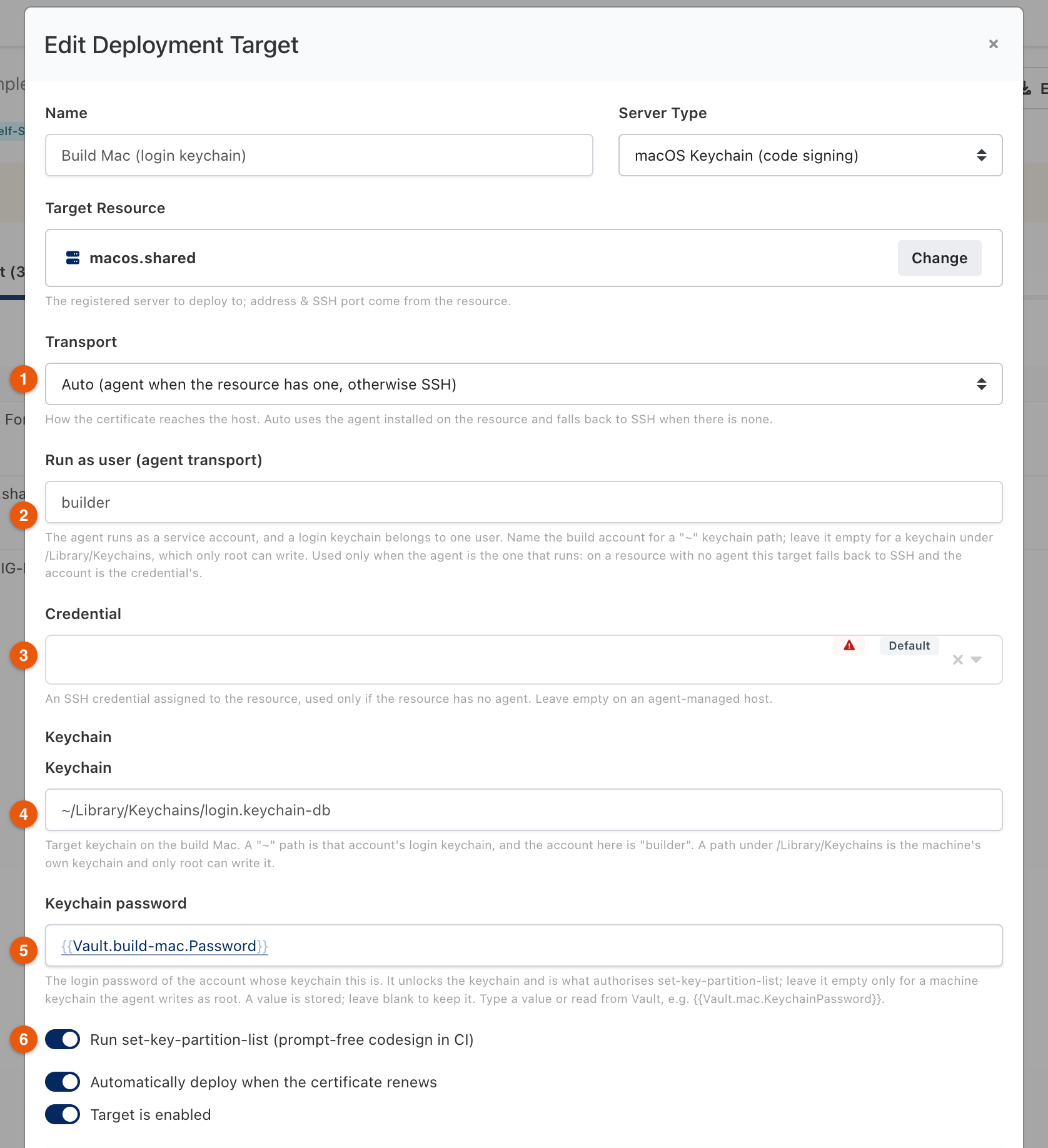
Figure 1. A macOS Keychain target. The certificate's Deployment tab → Add Target.
1. Transport: how Monopam reaches the host
Transport | What happens | What it needs |
|---|---|---|
Auto (1) | The agent on the linked resource when there is one, otherwise an SSH session from a gateway. The run says which it used. | Nothing extra. This is what a new target starts on. |
Agent on the resource | The agent runs the deployment from inside the host. No SSH service, no SSH account and no stored credential are involved. | The resource must have an enrolled agent, version 0.4.1 or later (0.4.2 or later for a certificate that carries provisioning profiles, which makes the deployment larger than older agents accept). |
SSH session from a gateway | A gateway opens an SSH session to the host and does the work there. This is how every host target worked before v2026.10. | The host's SSH service, and a credential on the target. |
A target created before v2026.10 is on SSH session from a gateway and stays there until somebody changes it, so upgrading changes nothing about how your existing targets run.
2. Which account does the work
This is the part worth reading twice: a field that does not apply to the current transport is simply ignored, and the dialog hides it. The table is the whole rule.
Transport | Credential (3) | Run as user (2) | The deployment runs as |
|---|---|---|---|
Agent | Hidden. Not used. | empty | The account the agent service runs as, which is root on a standard installation. |
Agent | Hidden. Not used. | an account name | That account, with its own home directory. The files Monopam writes are handed to it first. |
SSH | Required. Saving without one is refused. | Hidden. Not used. | The credential's own account, plus |
Auto, resource has an agent | Ignored | As the Agent rows above | As the Agent rows above. |
Auto, resource has no agent | Used | Ignored, and the run says so | The credential's own account. A target left with no credential fails here, which is the moment the fact is knowable. |
- Run as user is offered only where the work reads one person's files: a macOS login keychain, and a
~/.kube/configfor a Kubernetes target. Everywhere else the agent's own identity is the right one and the field is not shown. - Run the deployment with sudo applies to the SSH transport. Through the agent it does nothing, because the agent is already root.
- An Auto target that falls back to SSH says so on the run, and names Run as user if one was set and ignored.
3. macOS: which keychain, and whose
security import writes into one keychain, and a keychain belongs either to one person or to the machine. The Keychain field (4) and Run as user (2) have to agree, or the identity lands somewhere no build will look. Monopam refuses the two combinations that cannot work.
Keychain (4) | Run as user (2) | Result |
|---|---|---|
| the build account | The identity goes into that account's login keychain. This is the setup for code signing. |
| empty, on the agent transport | Refused: The agent runs as a service account, so the login keychain would not be the one the build user sees. Set "Run as user" on this target, or switch its transport to SSH. |
| empty | The machine's own keychain, written by the agent as root. Right for a certificate the machine uses, not for a per-user signing identity. |
| an account name | Refused: only root may write a machine keychain, so handing the import to a named account cannot work. |
| over SSH | The login keychain of the account the credential signs in as. |
4. Keychain password
The Keychain password (5) is the login password of the account whose keychain this is. It does two things: it unlocks the keychain, and it is what authorises security set-key-partition-list, the step that lets codesign use the key without asking for permission.
Run set-key-partition-list (6) is on by default and needs this password. With the switch on and no password stored, the certificate still imports and the step is skipped: the run says so, and codesign asks for permission on that Mac until a password is stored. On a headless build agent that reads as a hung build.
The field takes a Vault reference, which is the way to avoid storing the password on the target: {{Vault.build-mac.Password}}.
5. Three setups that work
You have | Set |
|---|---|
A build Mac with an agent, signing as | Transport Auto or Agent, Run as user |
A Linux web server with an agent | Transport Auto, no credential, no Run as user. The files are written as root and the reload command runs as root. |
A host with no agent | Transport Auto (or SSH) and a credential. Add Run the deployment with sudo if the certificate directory belongs to root. |
6. Seeing which transport a target used

Figure 2. Certificates → Deployments.
- via agent (1): the target is fixed to the agent.
- agent or SSH (2): the target is on Auto and picks per deploy.
- via SSH: the target is fixed to an SSH session.
- The run itself names what it actually used: Reached through the agent installed on the resource. or Reached over SSH: the linked resource has no agent to deploy through.
7. Checking it before you save
Test connection, at the bottom of the dialog, opens a session the same way a deploy would and runs one harmless command on the host. It uses the settings as they are in the dialog, so it works on a target you have not saved yet; it becomes available as soon as a target resource is picked, because that is where the transport is resolved from.
- Connection succeeded through the agent on {host}. — the agent answered.
- Connection succeeded over SSH to {host}. — the credential signed in.
- No credential is linked to this deployment target. — the target resolved to SSH and has no credential; either pick one or give the host an agent.
- An appliance or cloud target answers that the test does not cover it: use Deploy instead.
Troubleshooting
What you see | Why | What to do |
|---|---|---|
This target is set to deploy through the agent, but the linked resource has no registered agent. | Transport is Agent and the resource is not agent-managed, or its agent never enrolled. | Enrol the agent on that host, or set the transport to Auto or SSH. |
A credential is required for the SSH transport. | The target is fixed to SSH and no credential is picked. | Pick one, or switch the transport to Agent or Auto to deploy through the agent. |
The agent on this host has no deployment endpoint, so it cannot run the deployment. | The agent on that host is older than the deployment endpoint. | Update the agent on the host, or set the transport to SSH. |
The run says Succeeded and nothing changed on the host | Agents older than 0.4.1 reported every answer as a success. The command did run, and failed. | Open View output on the run for the real error, and update the agent to 0.4.1 or later. |
Could not read the request body. on every certificate after the first one | The agent on that host accepts 64 KB in one request (agents up to 0.4.1). The deployment sends the certificate and every provisioning profile bound to it in that one request, about 20 KB each, so a certificate with profiles passes the limit while one without them fits. | Update the agent on the host to 0.4.2 or later. Without touching the agent: set the target's transport to SSH, which has no such limit. |
security: SecKeychainItemImport: Write permissions error. | A machine keychain was handed to a named account. | Clear Run as user, or point the target at that account's own keychain. |
| The partition list was not set, because no keychain password is stored. | Store the keychain password on the target and deploy again. |
… Permission denied while writing the certificate | The account the deployment runs as cannot write the directory. | On SSH: turn on Run the deployment with sudo or grant write access. Through the agent: check Run as user and the directory's permissions. |
Related
- Certificate deployments
- Agents
- Certificates for Apple code signing