Everything Monopam can do with an IIS server: import a managed certificate into the machine store, point one HTTPS binding at it, and confirm the result by reading the thumbprint back out of the server rather than from an API's answer. Through the agent on the server, or, where there is none, over WinRM from a Windows gateway.
| How it connects | The Monofor agent on the resource, or WinRM from a Windows gateway when the server has no agent |
|---|---|
| What it writes | The PFX into LocalMachine\My, one HTTPS binding in IIS, and that binding's certificate in http.sys |
| What it costs | Nothing. No site stop, no application pool recycle, no server restart |
| How success is decided | By the thumbprint http.sys returns for the binding after the write |
| Undo | Restore the previous certificate from the deployment's history, or take back what the deployment created |
Before you start
Applies to | Who can do this |
|---|---|
Monopam v2026.09 or later | Administrators with permission to deploy certificates. |
You need four things:
| What | Detail |
|---|---|
| The server, registered as a resource | A Windows resource in Monopam. The deployment target is addressed by that resource, not by a hostname typed into the target |
| A way in | Either the Monofor agent enrolled on that resource (preferred), or a Windows gateway that can open a WinRM session to the server plus a Windows account stored in the vault. The two routes are compared below |
| IIS, with the site already there | Monopam creates the binding when it is missing. It never creates the site. A target naming a site that does not exist fails and writes nothing |
| A certificate with its private key | An imported certificate with no key cannot be deployed anywhere. The inventory marks which ones carry a key |
Where the certificate actually lands
This is the part worth reading before the first deployment, because it explains nearly every surprise an IIS certificate can produce. A binding on an IIS site does not hold a certificate. It holds a reference, and the certificate itself is registered in http.sys, the kernel component that owns the port. Those are two separate pieces of state, kept in two separate places, and they are keyed differently.
IIS site "Default Web Site"
  binding  *:443:shop.monofor.com      <- applicationHost.config
                 |
                 |  the port and the host, not the certificate
                 v
http.sys
  hostnameport=shop.monofor.com:443  ->  hash  ->  LocalMachine\My
  ipport=0.0.0.0:443                 ->  hash  ->  LocalMachine\My
A deployment therefore does three things in order, and all three have to succeed:
- Import the PFX into
LocalMachine\My(or the store named on the target). - Create the HTTPS binding on the site if it is not there yet, with SNI switched on when the target names a host.
- Register the certificate in http.sys under the binding's key, then read it back.
The key is what separates one site's certificate from another's on the same port:
| The binding | The key in http.sys |
|---|---|
No host header, IP *, port 443 | ipport=0.0.0.0:443 |
| No host header, IP 10.55.0.7, port 443 | ipport=10.55.0.7:443 |
Host header shop.monofor.com, port 443 | hostnameport=shop.monofor.com:443 |
Using the wrong key does not fail. It reads, or overwrites, another site's certificate. This is the one mistake on this page that is silent, which is why Monopam derives the key from the target's own fields and never from the site name.
One port, several sites
Several HTTPS sites on one address and one port is ordinary, and it works because each named host gets its own entry in http.sys. The rules that follow from the table above:
- Two sites on the same port need different host headers. Give each target the host it answers for, and each keeps its own certificate.
- A catch-all and a named host can share a port. The binding without a host header is stored under
ipport=and is not disturbed by ahostnameport=entry on the same port, nor the other way round. - Two bindings on one port with no host header are the same slot. Whichever was deployed last wins, and the other site quietly starts serving it. Separate them by host header or by IP.
This was measured rather than assumed. On one lab server, seven bindings across five sites, each with its own certificate:
| Site | Binding | Key in http.sys |
|---|---|---|
| site a | port 8443, no host | ipport=0.0.0.0:8443 |
| site a | port 8444, no host | ipport=0.0.0.0:8444 |
| site b | port 8445, no host | ipport=0.0.0.0:8445 |
| site b | port 8446, host iis-b | hostnameport=iis-b...:8446 |
| site c | port 8500, host c | hostnameport=c...:8500 |
| site d | port 8500, host d | hostnameport=d...:8500 |
| site f | port 8443, host f | hostnameport=f...:8443 |
Sites c and d shared port 8500 and kept a certificate each. Site f's host-scoped binding on 8443 left site a's catch-all on the same port alone. The server's other bindings, which Monopam had never been told about, were unchanged throughout.
Create the deployment target
On the certificate, open the Deployment tab and press Add Target. Pick server type Windows / IIS.
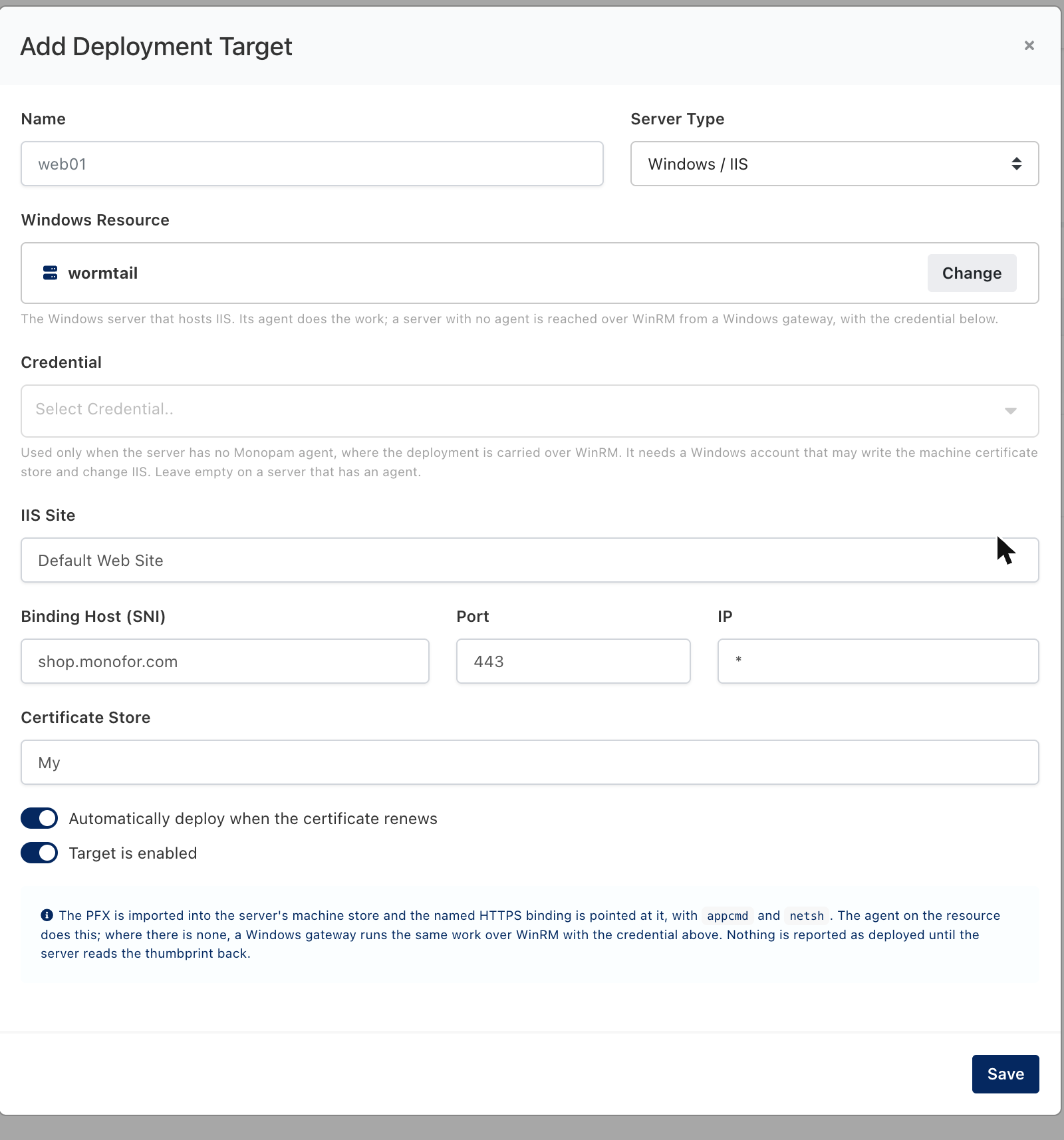
Figure 1. A Windows / IIS target. The certificate's Deployment tab, then Add Target.
| Field | Required | What it means |
|---|---|---|
| Windows Resource | yes | The registered Windows server that hosts IIS. Its agent does the work where there is one |
| Credential | only without an agent | A Windows account that may write the machine certificate store and change IIS. Used only on the WinRM route; ignored on a server that has an agent |
| IIS Site | yes | The site exactly as IIS names it. Not created if it is missing |
| Binding Host (SNI) | no | Leave empty for a catch-all binding. Fill it in and the binding becomes SNI-scoped, which is what lets the port be shared |
| Port | no | 443 by default |
| IP | no | * means every address, which http.sys spells 0.0.0.0 |
| Certificate Store | no | The machine store the PFX is imported into. My (Personal) unless you have a reason |
With an agent, or without one
The same work reaches the server two ways. The script is identical: it uses appcmd.exe and netsh.exe, which are present on every IIS host, rather than a PowerShell module, so it carries no assumption about the shell it lands in. What differs is the prerequisites, and a successful run says which route carried it.
| Agent on the server | WinRM from a gateway | |
|---|---|---|
| Direction | The agent connects outbound to Monopam. No inbound rule towards the server | The gateway connects inbound to the server on the WinRM port |
| Account | None stored. The agent already runs as the machine | A Windows account in the vault, picked on the target |
| Gateway | Any gateway that can reach the agent | Must be a Windows gateway. A gateway on Linux or in a container cannot open a WinRM session and says so |
| Behind NAT | Works | Does not |
| The run says | Deployed to IIS on '<site>' (<ip>:<port>). | the same, plus over WinRM, with no agent on the server |
Prefer the agent. The WinRM route exists for servers that cannot take one.
The agentless route has not yet been proven on a live server. It is implemented and its refusals were exercised in the lab (a gateway that is not on Windows, no gateway available, a gateway whose API key does not match its Monopam record), but no deployment has yet travelled it end to end. Treat it as unproven until a run of your own confirms it. The agent route is unaffected and was verified across seven bindings on five sites.
Deploy
Press Deploy on the target. There is no service interruption: nothing is stopped, recycled or restarted, and the binding is repointed in place. A successful run reads:
Deployed to IIS on 'Default Web Site' (*:443, host shop.monofor.com).
The binding now serves 68B29208A0554529164E6CA42EEFAE94F382EB24.
That thumbprint is not what Monopam sent. It is what the server answered when asked, after the write, which certificate the binding serves. A deployment that wrote nothing cannot report success.
Check it from the server
On the server, ask http.sys directly. Use the key that matches the binding:
netsh http show sslcert hostnameport=shop.monofor.com:443
netsh http show sslcert ipport=0.0.0.0:443
The Certificate Hash in the output is the thumbprint the run reported. From outside the server, a browser or openssl s_client -servername shop.monofor.com -connect shop.monofor.com:443 shows the same certificate.
Renewal
Automatically deploy when the certificate renews is safe to leave on for this target type. Nothing restarts, and the binding is repointed in place, so a renewal is as quiet as the first deployment. Each target follows its own binding, so a certificate with several IIS targets renews onto all of them.
Undo
Every deployment records what the binding held before it ran. From the deployment's history:
- Restore previous certificate puts the binding back on the certificate it served before. The run reports
'<site>' bound back to the certificate it served before. - Remove what was deployed takes back what this deployment created, for a binding that did not exist before it.
The displaced certificate is left in the machine store, because another site may be using it. Remove it by hand only when you know nothing else serves it.
If something goes wrong
| What you see | What it means | What to do |
|---|---|---|
Cannot find SITE object with identifier "..." | The site named on the target does not exist on that server. Nothing was written | Correct the site name. It must match IIS exactly, spaces included |
IIS is not installed on this server (appcmd.exe is missing). | The resource is a Windows server, but not an IIS one | Check which server the target points at |
No Windows agent is registered on the selected resource. on an older build | Before the WinRM route existed, a server with no agent was refused outright | Upgrade, or enroll the agent |
This server has no installed agent, so it is reached over WinRM instead, which needs a Windows account ... | The agentless route was taken and the target has no credential | Pick a credential on the target, or install the agent on the server |
... needs a Windows gateway: this gateway runs on macOS ... | WinRM is not available to a gateway outside Windows | Route the deployment through a Windows gateway, or install the agent |
The server could not be reached over WinRM: ... | The session never opened: the port, the firewall, the WinRM service or the account | From the gateway, Test-WSMan <server>, then try the account |
netsh refused the certificate for <key>: ... | http.sys would not take the certificate, often because the private key is not readable or another application already owns the port | The previous certificate is put back automatically. Read the message: it is http.sys's own |
... the server did not confirm the binding. | The script ran but the server did not report the thumbprint | Nothing is assumed to have worked. The rest of the message carries what the server said |
| Another site on the same port lost its certificate | Two bindings resolved to the same key in http.sys, both without a host header | Give the sites distinct host headers, or distinct IPs |
| A deployment says it succeeded but the site serves the old certificate | Builds before this one reported success for any answer, including a script that had failed | Upgrade. Success is now decided by the server's read-back |
What Monopam does not do here
- It does not create or start the IIS site.
- It does not touch any binding other than the one the target names, including other bindings on the same port.
- It does not remove the displaced certificate from the machine store.
- It does not configure a web farm or shared configuration. Each server is its own target.
- It does not deploy to Windows services other than IIS. For files plus a command of your own, use the Windows / generic target type.