Syncs push secrets from Monopam to the stores applications already read: AWS Secrets Manager, Azure Key Vault, GCP Secret Manager and Kubernetes Secrets. Monopam stays the source of truth; the push is one way.
Applies to | Who can do this |
|---|---|
Monopam v2026.10 | Administrators with permission to manage syncs. |
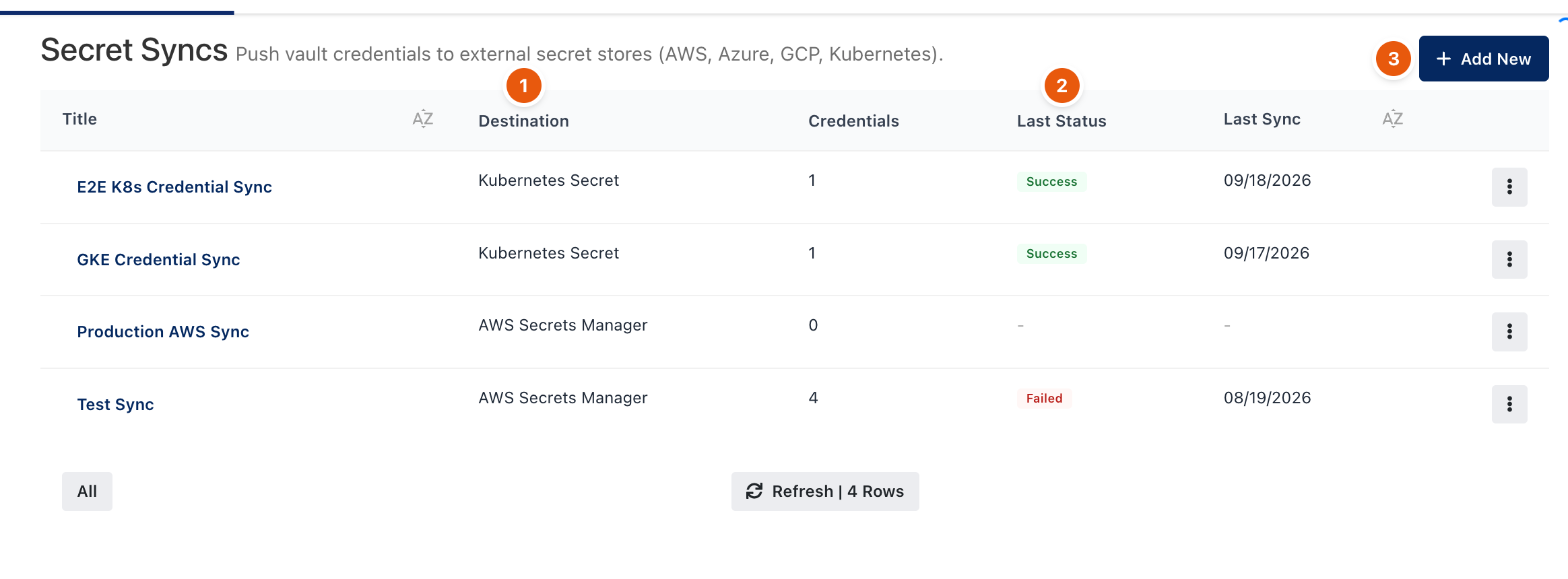
Figure 1. Secrets → Syncs.
Two kinds of sync
Kind | Where | What it pushes |
|---|---|---|
Credential sync | Secrets → Syncs | Vault credentials (user name and password, SSH keys, secret text), as JSON with all fields or as the password only. It can push again after a credential is saved or rotated. |
Project sync | A project's Syncs button | The resolved secrets of one environment. It can push again whenever a secret in it changes. |
Create a sync
- Click Add New (3) and choose the Destination (1). Enter the destination's access details; they are stored encrypted and shown masked.
- Choose what to push and, for Kubernetes, the Secret type.
- Optionally turn on automatic sync, and Remove from destination to delete pushed secrets when they are removed here.
- Save and run the sync. Last Status (2) shows the result of the last run.
Before every push Monopam reads the destination back. A value changed at the destination is overwritten and recorded as Last Change Outside Monopam. Verify compares without pushing.
On Kubernetes, Monopam replaces or deletes only Secrets it created (label app.kubernetes.io/managed-by: monopam). A Secret with the same name and no label is left alone and the sync fails.
Troubleshooting
What you see | Why | What to do |
|---|---|---|
Failed in Last Status. | Wrong access details, a missing permission at the destination, or a foreign Kubernetes Secret with the same name. | Open the sync to read the error and fix the destination. |
Related
- Projects and environments
- Password rotation and reconcile