Monopam can read the local accounts of a machine, show which of them are administrators, and take them into the vault so their passwords are managed and rotated.
Applies to | Who can do this |
|---|---|
Monopam v2026.10 | Administrators with permission to manage resources and the vault. |
Before you begin
- The resource has a Privileged Credential: an account Monopam uses to read and change local accounts. Without it, discovery stops with Privileged Credential not found!
- The machine is reachable through a gateway (agentless) or runs the resource agent.
Set the privileged credential
On the resource, open the Privilege tab and choose the Privileged Credential (1). The button next to it tests the credential. File Operations Credentials (2) choose the accounts used for upload and download in RDP and SSH sessions.
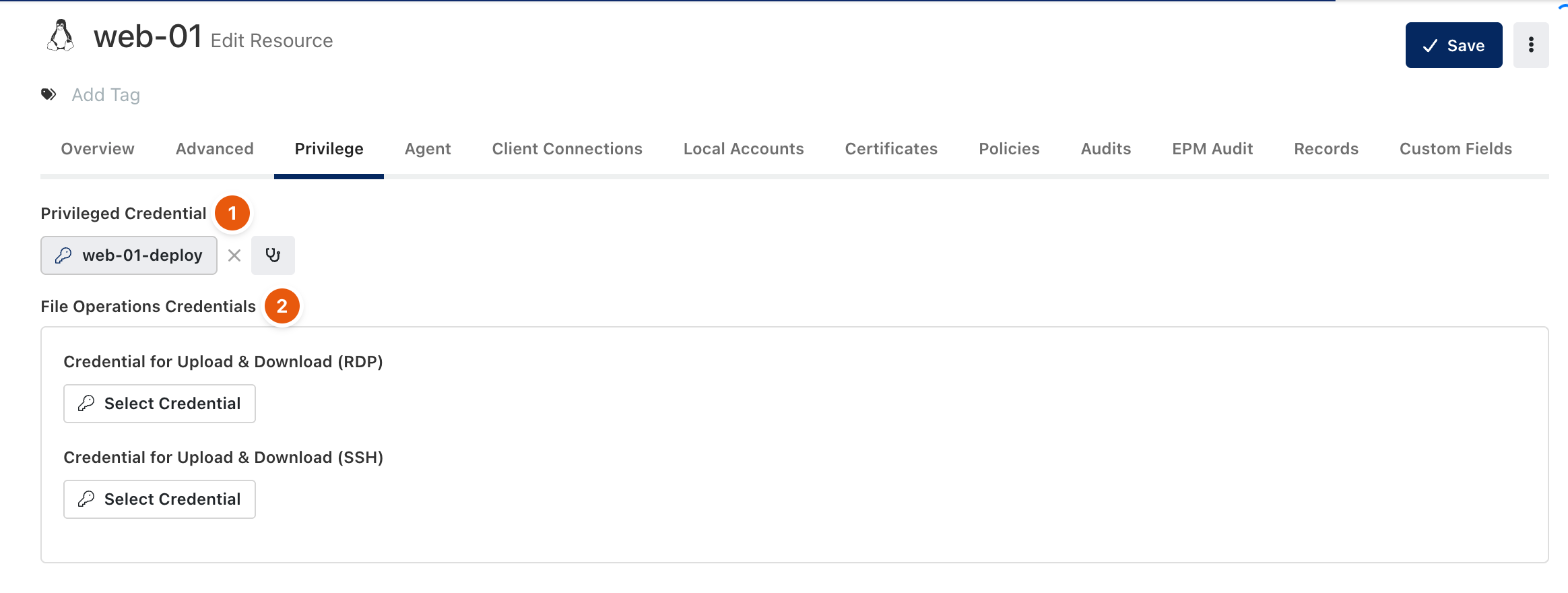
Figure 1. The resource's Privilege tab.
Discover and import local accounts
- Open the resource's local accounts discovery from the Local Accounts tab. Monopam lists the accounts it found, with Local Admin, Built-in, Flags, Dependencies and Status.
- Turn on Exclude Built-in Accounts to hide system accounts (on Linux, accounts below uid 1000; root is always shown).
- Select the accounts and click Import Accounts. When importing you can reset their passwords, assign them to a Password Policy, a Rotation Policy and a Vault Access Policy.
The Local Accounts tab of the resource then lists the vault items that belong to it, with their status and last access. To find local accounts on many machines at once, use a Discovery Policy with Discover Local Accounts turned on; see Discover privileged accounts.
Troubleshooting
What you see | Why | What to do |
|---|---|---|
Privileged Credential not found! | The resource has no privileged credential. | Set one on the resource's Privilege tab. |
Every system account appears in the list. | Exclude Built-in Accounts is off. | Turn it on. |
Related
- Add a resource
- Vault items
- Password Rotation Policy
- Discover privileged accounts